ASPL User Guide v 1.00
© 2025 Bassem W. Jamaleddine
15. 2Interrogating a Similarity Variable
Similarity assigned to COS variable
cosvar = sim a1 a2 [a3 .. aN] where cosvar is a COS variable and a1 a2 [a3 .. aN] are set variables
Display the COS symbol table
cos
Interrogate the similarity variable
?c cosvar where cosvar is similarity COS variable
Really Interrogate the similarity variable
??c cosvar where cosvar is similarity COS variable
Interrogating a Similarity Variable
Interrogating a Similarity Variable
Use the similarity operator to compare one or many set variables. This operator is setadic (it comes first on the line) then it is followed by one or more set variables. However it can be preceded by a left variable and the equal sign, in which case the similarity result is assigned to the left variable and the result in saved in ASPL COS symbol table.
Interrogating a Similarity Variable EXAMPLEWe want to compare the similarity between directories on the UNIX file system.
The sample workspace WS1 holds the datasets of three directories /tmp/aa1,
Having defined the set variables a1, a2, and a3, we want to show the similarity between these three variables.
In this example we start ASPL by loading the sample workspace WS1 then issue the similarity operator to compare the set variables a1, a2, and a3.
The similarity operator can be associated with a predicate. Use the tick operator shown in the table below for compare the similarity according to a specific predicate.
For example, we will use sim`c to get the similarity between variables a1, a2, and a3 taking into consideration the checksum attribute of their subgroups or elements.
We can also save the similarity results into COS variables. ASPL has a COS symbol table where COS variables are saved. You can display the content of the COS symbol table with the COS command, and you can even interrogate a COS variable by preceding it with the COS interrogation operator ?c.
The following operations summarize the usage of the similarity operator and the ?c operator.
similarity OPERATION1# aspl WS1
(start ASPL loading the sample workspace WS1)
① aspl>
sim a1 a2 a3
(show the similarity between a1, a2, and a3)
② aspl>
sim`c a1 a2 a3
(show the similarity between a1, a2, and a3 considering the checksum attribute)
③ aspl>
sima123 = sim a1 a2 a3
(assign to the COS variable sima123 the similarity result)
④ aspl>
cos
(print the COS symbol table)
⑤ aspl>
c d sima123
(print the internals of the COS variable sima123)
⑥ aspl>
?c sima123
(interrogate the COS variable sima123)
⑦ aspl>
cos sorted
(show the sorted COS symbol table to see if anything changed or archived)
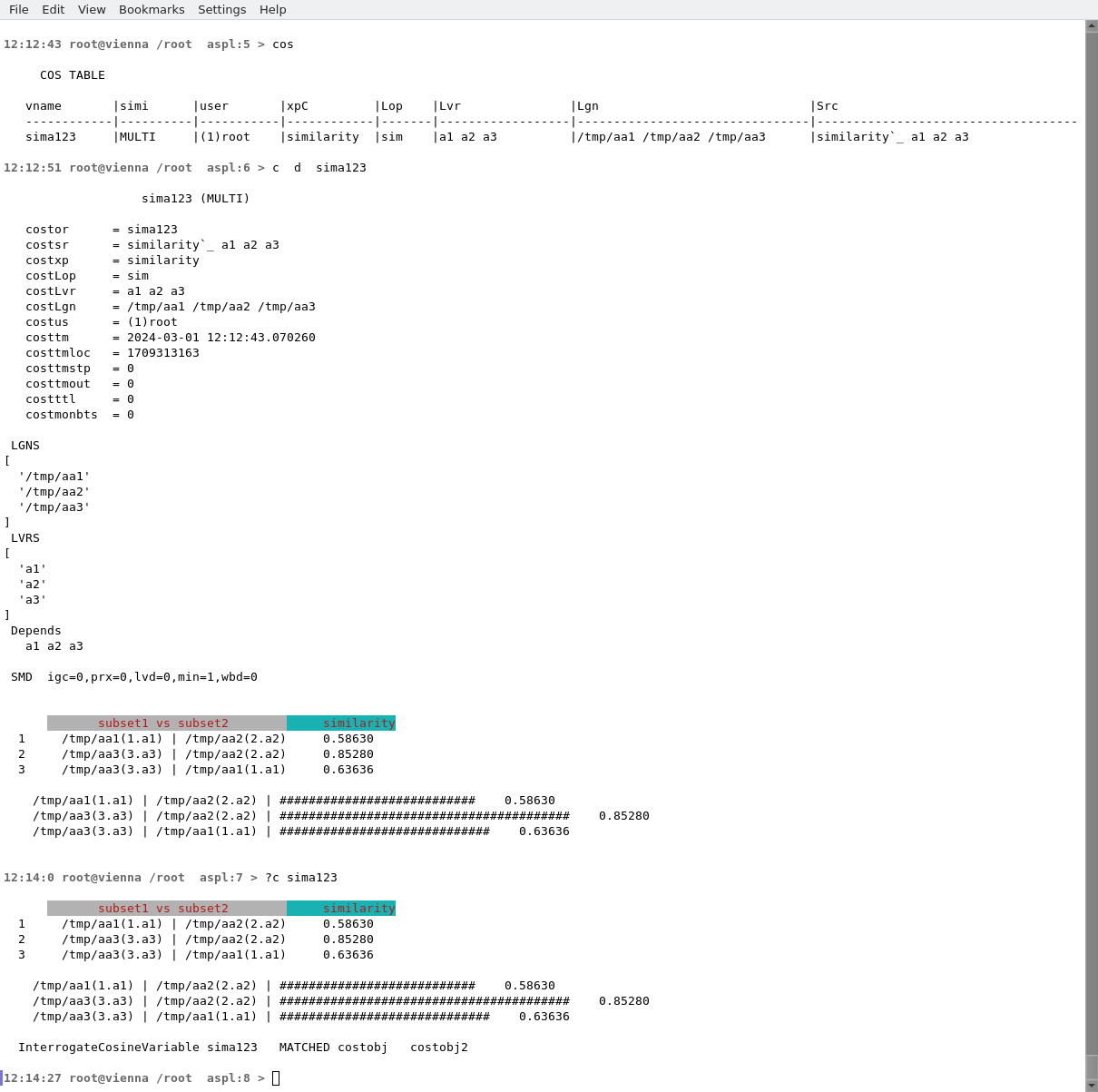
The following figure shows the operations performed in this second example.
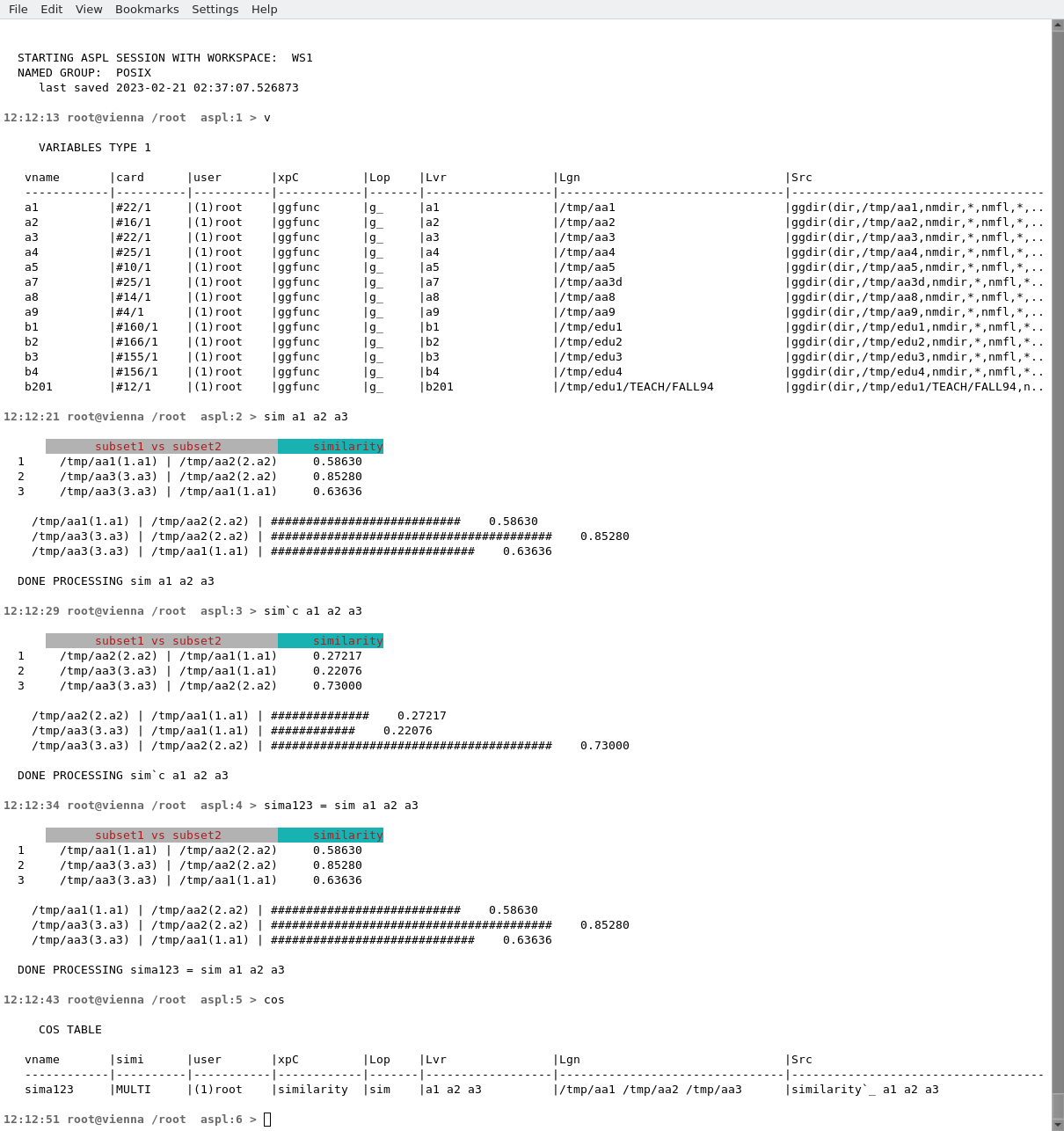
The interrogation of COS variable sima123 and its historical similarity is shown in figure FFFF. Since no change in the variables then the similarities remained the same and the COS variable remained the same without any historical.