ASPL User Guide v 1.00
© 2025 Bassem W. Jamaleddine
21. 3Gaussian Distribution on UNIX Random Device
Gaussian Distribution on UNIX Random Device
ELEMENTS-GROUPING-CLASS: TIERANDGAUSSIANGROUP
GG-function: ggtierandomgaussian()
Sample workspace: TIERANDGAUSSIAN
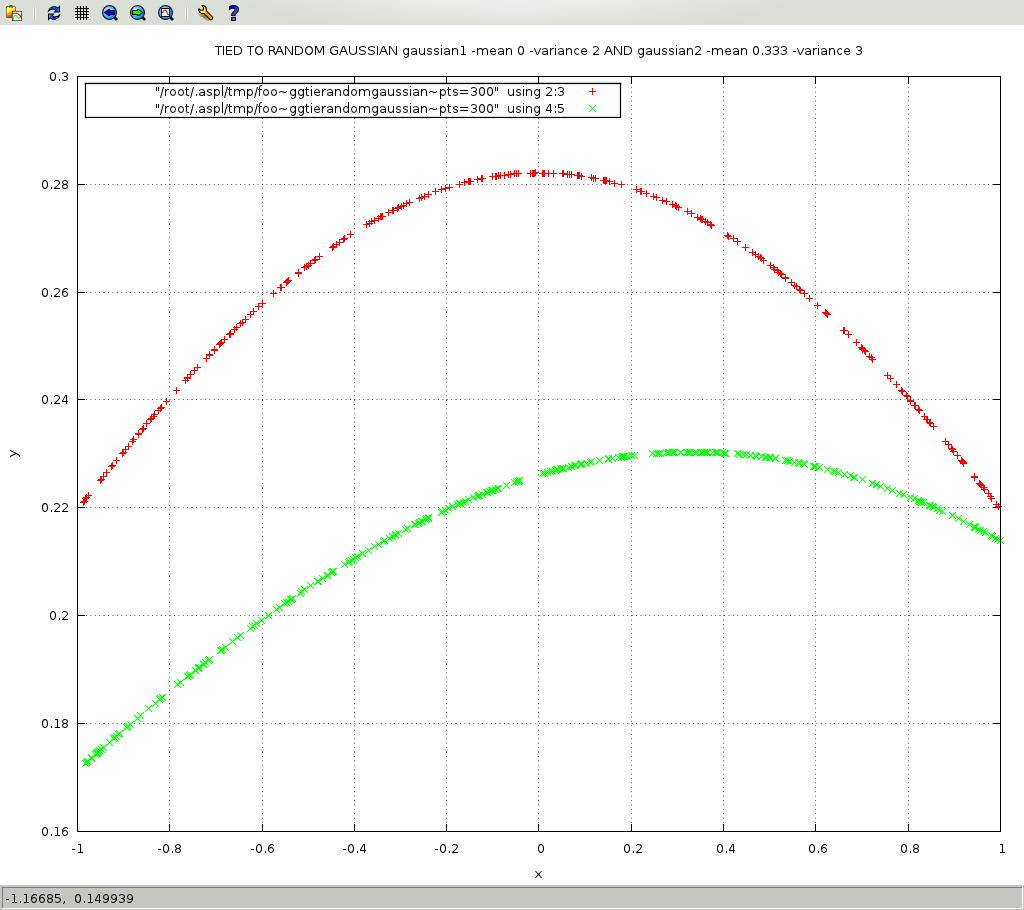
Stream three hundreds random numbers and get their Gaussian distribution
R1 = ggtierandomgaussian(grp1,RanGauss1,points,300) where R1 is a set variable
Passing control arguments to gaussian1's lambda function
setExecattrArgs gaussian1 -mean 0 -variance 2
how to tie to lambda functions and pass tied attributes as arguments
In the previous chapter, "Tying Attributes to UNIX urandom Device", we showed how to stream data by tying attributes to UNIX random device. In this chapter, we show how to run lambda functions on the streamed data. In particular, we want to tie two attributes to UNIX random device, and have an additional two attributes to process the streamed data by returning their Gaussian distribution. The following command, when typed at the shell prompt, creates the element grouping class TIERANDGAUSSIANGROUP with the following four attributes: rn1, rn2, gaussian1, and gaussian2. The first two attributes are tied to UNIX devices, and the last two attributes are tied to anonymous procedures.
# metagrouping -creategrouping TIERANDGAUSSIANGROUP -attributes "rn1,t" "rn2,t" "gaussian1,c,__gaussian1 rn1" "gaussian2,c,__gaussian2 rn2"
The listed attributes are quoted and space delimited, and each attribute is followed by either a comma and a little t saying that the attribute is to be tied to a streaming function, or by a comma and a little c saying that the attribute is to be processed by an anonymous procedure.
We will use some shortcut commands to explain the layout of the tying process. Refer to appendix "Shortcut Commands and tilde Extansions" for the list of shortcut commands used in this guide.
To view the structured tree of the tie mechanism serving the element grouping class TIERANDGAUSSIANGROUP, you can use this shortcut.# asplcmd "load TIERANDGAUSSIAN;tree ~tie"
The output may vary since you may have installed ASPL relative to a different directory, but at least you should see a tree whose stem is GGs/TIERANDGAUSSIANGROUP/LOADED ASPL SESSION WITH WORKSPACE: TIERANDGAUSSIAN last saved 2025-03-14 01:58:11.314949 /opt/ASPLv1.00/BRIDGE/ASPL/GGs/TIERANDGAUSSIANGROUP |-- Anoncode.pm |-- Feeder | `-- Udev.pm |-- TieScaAttDev.pm |-- TiSCA_aggg.pm |-- TiSCA_crrr.pm |-- TiSCA_init.pm |-- TiSCA_irrr.pm |-- TiSCA_rn1.pm `-- TiSCA_rn2.pm 1 directory, 9 files
The only two files that the programmer may need to edit are: Anoncode.pm and Udev.pm. The first contains the lambda procedure definitions for the tied-lambda attributes, and the second contains the streamer function definitions for the tied-streaming attributes.
You can display the Udev.pm associated with the TIERANDGAUSSIAN:# asplcmd "load TIERANDGAUSSIAN;~feeder;catfile Udev.pm"
To edit the Udev module where the tied attributes rn1, rn2, and rn3, are being served, you cam use this shortcut:# asplcmd "load TIERANDGAUSSIAN;~udev"
You can display the Anoncode.pm associated with the TIERANDGAUSSIAN:# asplcmd "load TIERANDGAUSSIAN;~tie;catfile Anoncode.pm"
To edit the lambda functions associated with the attributes gaussian1, gaussian2, and gaussian3, you can use this shortcut.# asplcmd "load TIERANDGAUSSIAN;~anoncode"
CONTROL PARAMETERS:For example:
It's often useful to be able to pass parameters to a lambda procedure.
Parameters are used to supply information to the procedure as such
to control its the internal processing, we call them: control parameters.
ASPL provides the command setExecattrArgs that you can use at the
ASPL prompt to pass information. Through the use of this command you can
specify your desired parameters to be passed to a lambda procedure.
The list of parameters are passed as a hyphened delimited string.aspl> setExecattrArgs gaussian1 -mean 0 -variance 2
ASPL will then reply:aspl> setExecattrArgs gaussian1 -mean 0 -variance 2 - /opt/ASPLv1.00/lib/ASPL/Directory/DDM.pm 2278 ASPL::EmVectors::Vectored::setExecattrArgs - /opt/ASPLv1.00/bin/aspl 16713 ASPL::Directory::DDM::setExecattrArgs - /opt/ASPLv1.00/bin/aspl 3741 main::doLn3rd The control-arguments-hash for the attribute gaussian1's executable function: -variance => 2 -mean => 0 gaussian1 -mean 0 -variance 2
Here gaussian1 is a tied-lambda attribute (recall that it is tied to __gaussian1), and what follows it is the hyphened string that is passed as an object (in $cargsHash) to the __gaussian1 procedure in Anoncode.pm.
Let's display the header of the procedure __gaussian1 defined in Anoncode.pm# asplcmd "load TIERANDGAUSSIAN;~tie;catfile 44,49 Anoncode.pm"
44.    sub __gaussian1 {
45.    my ($cargsHash,$rattHash, $tiedclass,$vb) = @_;
46.    # - control arguments hash passed in $cargsHash
47.    # - related attributes hash passed in $rattHash
48.    # - access to the tied class via $tiedclass
49.    # - verbose can be set with -jC
To enable verbose on tied-lambda procedure, simply add the option -jC when you start ASPL.
You can use any editor to make changes to Anoncode.pm. This file only exists if your group has tied-lambda attributes, and its location can be revealed with the following command:# asplcmd "load TIERANDGAUSSIAN;~tie"
Once you locate the directory, you can use whichexp to print the content of that directory:# whichexp /opt/ASPLv1.00/BRIDGE/ASPL/GGs/TIERANDGAUSSIANGROUP "*"
The location of the GG-Container can be revealed by using the tilde expansion ~gg# asplcmd "load TIERANDGAUSSIAN;~gg"
In this directory you can find the GG-function ggtierandomgaussian() defined in its own module ggtierandomgaussian.pm.
The following code snippet shows the call to $egC->anonAttr() inside ggtierandomgaussian.pm:my $rn1 = sprintf "%.5f", $hook-> {rn1}; my $rn2 = sprintf "%.5f", $hook-> {rn2}; # ... # NOTE since gaussian1 and gaussian2 have related attributes rn1 # and rn2 respectively then pass them as hash in $z my $z = {}; $z->{rn1} = $rn1; $z->{rn2} = $rn2; my $gaussian1 = $egC-> anonAttr( 'gaussian1', $z, $hook); my $gaussian2 = $egC-> anonAttr( 'gaussian2', $z, $hook);In the code above, $hook-> {rn1} is at the right of the assignment, this is a FETCH in the tie context. To call the tie-lambda procedure tied gaussian1, we use this code
$egC-> anonAttr('gaussian1', $z, $hook) The arguments to anonAttr() are: the attribute name, the related attribute hash if any, and the reference $hook.
Once again, notice that in the metagrouping command we issued earlier, we have the following attributes definition: -attributes "rn1,t" "rn2,t" "gaussian1,c,__gaussian1 rn1" "gaussian2,c,__gaussian2 rn2"
The attribute gaussian1 is tied to lambda procedure __gaussian1, and the related attribute rn1 is to be passed to the procedure. The attribute gaussian2 is tied to lambda procedure __gaussian2, and the related attribute rn2 is to be passed to the procedure. The related attributes are just arguments to be passed as an object (in $rattHash) to the procedures in Anoncode.pm.
Often the call to a tied-streaming attribute precedes the call to its tied-lambda attribute counterpart. In particular, if a tied-lambda attribute depends on the result of a tied-streaming attribute, then it is customery to have the tied-streaming attribute processed first so that you can pass its value to the procedure. This is demonstrated in the code above.
See appendix "ASPL envvar Command" for more information on ASPL tilde expansion.
The following figure shows the random Gaussian distribution with ASPL tied lambda functions.
The following terminal shows the output when of the sample workspace TIERANDGAUSSIAN.
The following terminal show some of the operations performed previously while ASPL is in debug mode.