ASPL User Guide v 1.00
© 2025 Bassem W. Jamaleddine
aspl [-help] [-version] [-vversion|-vv] [-wsdir repos] [-wsname workspace] [-groupingclass namedelemgroupclass] [-verbose] [-bridgeless] [-dbgsess] [-STDIN] [-showonly] [-verb verb] [-asplconf FILENAME] [-ddmconf FILENAME] [-timeout NUMBEROFSEC] [-script asplscript] [-SCT] [-singlepass] [-nostrictld] [-globalvar] [-persistvar] [-syncwks] [-assignonce] [-disablearcvar] [-tattler] [-noansi] [-nocheck] [-noreloadGG] [-logfile filename] [-dm displaymode] [-dv 32bits] [-gB 8bits] [-kH] [-kC] [-jH [-jC]] [-jE] [-jV] [-jF] [-jL] [-jG] [-jZ]
   ASPL (1.00)

   aspl [-help] [-version] [-vversion|-vv]
       [-wsdir repos] [-wsname workspace] [-groupingclass namedelemgroupclass] [-verbose] [-bridgeless]
       [-dbgsess] [-STDIN] [-showonly] [-verb verb] [-asplconf FILENAME] [-ddmconf FILENAME] [-timeout NUMBEROFSEC]
       [-script asplscript] [-SCT] [-singlepass] [-nostrictld]
       [-globalvar] [-persistvar] [-syncwks] [-assignonce] [-disablearcvar] [-tattler]
       [-noansi] [-nocheck] [-noreloadGG] [-logfile filename]
       [-dm displaymode]
       [-dv 32bits] [-gB 8bits] [-kH] [-kC] [-jH [-jC]] [-jE] [-jV] [-jF] [-jL] [-jG] [-jZ]

Where:

  -help                  display this summary
  -version               display the program version
  -vv                    display the program version, build, and license
  -wsdir WSPREPOS        specify the directory where workspaces are saved, when specified
                           explicitly then it will override the repos name passed in the
                           environment variable ASPL_CLI_CONFIG
  -wsname NAMEDSPACE     specify the namedspace or workspace name to be loaded, when
                           specified then it will override the namedspace passed in
                           the environment variable ASPL_CLI_CONFIG, this is the
                           namedspace that ASPL interpreter will load at startup
  -groupingclass ELMGC   explicitly specify the element grouping class of the namedspace, if
                           not specified and namedspace already saved previously in repos
                           then ASPL will detect its grouping class automatically and load it
  -verbose               display verbose information at startup
  -bridgeless            start ASPL without the egC-Container, hence mocking El.G.C.
  -dbgsess               print debugging info from the session manager
  -STDIN                 pipe to the STDIN of ASPL, must be the last option on the command line
  -showonly              print what is set in ASPL startup arguments and exit
  -verb VERB             pass a verb to run by ASPL then exit, where VERB can be one of:
                            wls wlls wrm envvar arcvars vars description scratchpad hs hsall
  -asplconf FILENAME     pass in the aspl.conf configuration properties file to load
  -ddmconf FILENAME      pass in the ddm.conf through the command line
  -timeout NUMBEROFSEC   set a timeout in seconds when executing set operations, default to 17

  -script SCRIPTNAME     execute the file ASPL script named SCRIPTNAME
  -SCT                   trace the execution of the script while executing it
  -singlepass            single pass when parsing the srcipt, default is two passes
  -nostrictld            allow to load workspaces within a script

  -globalvar             ASPL variables are all global variables
  -persistvar            persist ASPL variables commiting them to the symbol table
  -syncwks               sync the loaded workspace persisting any change in it.
                            The sync is done following every command issued during runtime.
                            This is useful to allow global variables updated when multiple users are
                            sharing the same namedspace. This option is also settable in the envrionment
                            variable ASPL_CLI_CONFIG.
  -assignonce            each variable symbol cannot be assigned more than once, yet the variables can still
                            be interrogated and turned into differential variables; this is useful to make
                            sure that a variable is not being freely reassigned and overwritten
  -disablearcvar         archiving variables is enabled by default. If you are not interested in making the variables
                            interrogatable and turning them into differential variables then select this option.
                            This is also settable with ARC_VARIABLES=1 in aspl.conf.
                            Setting ARC_VARIABLES=0 in aspl.conf can be overriden with this option.
  -tattler               show the tattler as group objects are inserted in, read from, and/or deleted from the stacks
                            and the symbol tables
  -noansi                disable ANSI colors, in case you are using the interpreter on terminal
  -nocheck               load a saved workspace without checking consistency against its ELMD
  -noreloadGG            load the GGs functions container only at startup and disable it from being reloaded during run time;
                           when disabled, any changes in the GG-functions will not be detected and loaded; also this can be
                           disabled from within: reloadGG 0
                           By default reloading GGs is enabled, and the GG-Container can be easily triggered by touching
                           the file representing a GG-function, then by issuing the listing command from within ASPL: ggls
  -logfile LOGFILE       attach a log file, eg. -logfile aspl_datetime.log will write log in ~tmp directory; also see
                           option -jL
  -dm DISPLAYMODE        display mode of ASPL symbol tables and answer stacks.
                           It can be one of 1,2,3,4,5 or one of 1A,2A,3A,4A,5A. Default is 2.
  -dv 32BITS             32 bits vector for tracing execution
  -gB 8BITS              8 bits vector for tracing branching on predicate
  -kH                    enable AUTO Kvec for hooked attributes with every Zsum, post gg-processing, INTERNAL USE ONLY
  -kC                    enable AUTO Kvec for lamdba code attributes with every Zsum, post gg-processing, INTERNAL USE ONLY
  -jH                    verbose for hooked attributes that are tied asynchronous, at startup only but reloadable
  -jC                    verbose for lamdba code attributes and tied asynchronous attributes, at startup only but reloadable
  -jE                    GR reloading verbose
  -jV                    Element Grouping Class VERBUM for Enode initialization normalization formatting preprocessing visor, etc.
                           This option will cause reloading   EG_VERBUM;   INTERNAL USE ONLY
  -jF                    passed to GG-functions to allow verbose or whatever the programmer want to do with this flag
  -jL                    print long logger line, if -logfile is specified then logging is written to the logfile otherwise
                           printed to STDOUT
  -jG                    verbose when reloading the GGs. To enable GGs reload from within: reloadGG 1
  -jZ                    extra debug gee!


  Quick startup for ASPL users:
    # aspl                                start ASPL with default namedspace set in ASPL_CLI_CONFIG
    # aspl -verbose                       start ASPL with default namedspace and print basic information
    # aspl TRIVIAL                        start ASPL with the named workspace TRIVIAL
    # aspl TRIVIAL -verbose               start ASPL with the named workspace TRIVIAL and print basic information
    # aspl TRIVIAL -verbose -bridgeless   start ASPL with the named workspace TRIVIAL in bridgeless mode

  Environment Variables:
    The ASPL installer should have already configured your ASPL environment variables.
    See the manual on setting the environment variables:
      ASPL1_00_HOME     required and set to the directory where ASPL program is installed
      ASPL1_00_BRIDGE   required and set to the directory where ASPL will locate its bridged grouping class code
      ASPL1_00_PROMPT   customize and define the appearance of the ASPL prompt
      ASPL1_00_TMP      temporary directory used by the ASPL interpreter
      ASPL_CLI_CONFIG   settable in the client bash, view how ASPL view it with the command 'envvar'
                          # aspl -verb  envvar
      ASPL_DDM_CONFIG   optional, if not specified then default loading /opt/ASPLv1.00/etc/ddm.conf
      ASPL_SRV_CONFIG   optional, if not specified then default loading /opt/ASPLv1.00/etc/aspl.conf
      ASPL_EDITOR       the program editor to be used in ASPL, eg. ASPL_EDITOR=vim to use the vi editor

  envvar
     type envvar at the ASPL prompt to view the setting of your ASPL environment variables,
     along a wealth of tilde-expansions short commands.

  tilde
     type tilde at the ASPL prompt to view tilde-expansion shortcuts, or at the shell prompt
        # asplcmd tilde

  Program editor:
      you can define your favorite UNIX program editor by setting it to ASPL_EDITOR
        # export ASPL_EDITOR=vim
        # export ASPL_EDITOR=emacs
      or export ASPL_EDITOR in your bash profile

  Other useful commands for ASPL programmers:
      show the processing of startup arguments
          ASPL_DBG_ENTRY=1 aspl
      show the processing of startup arguments and shebang, then exit
          ASPL_DBG_ENTRY=3 aspl -wsname TRIVIAL -verbose
      show the loaded ASPL configuration files
          ASPL_DBG_ENTRY=4 aspl -showonly

      test ASPL scripting:
          # hello.aspl
          # cd `asplcmd ~shared`
          # cat hello.aspl | aspl -SCT -STDIN
          # cat hello.aspl | ASPL_DBG_ENTRY=1  aspl -SCT -STDIN
      test ASPL script passing arguments
          # echo123.aspl one two three

  Loadable configuation files:
      -asplconf FILENAME       configuration properties file to load. If not specified then load it either
                               from env. ASPL_SRV_CONFIG or from default /opt/ASPLv1.00/etc/aspl.conf
      -ddmconf  FILENAME       group DDM properties file to load. If not specified then load it either
                               from env. ASPL_DDM_CONFIG or from default /opt/ASPLv1.00/etc/ddm.conf

  Stack sizes and history with the option -keeps:
      -keeps   N1,N2,N3,N4     -Keeps is followed by four comma delimited integers defining the size
                               of the answer and history stacks; it only works with a new namedspace
                               since once a workspace is created, it is not possible to change
                               these sizes. There are three answer stacks, and one command history
                               stack; eg. -keeps 10,10,10,300 means to have each of the three answer
                               stacks 10 slots deep, and the history stack 300 slots deep. New
                               incoming elements will be rotated once the stack reaches its maximum.
                               The ASPL_CLI_CONFIG also contains the stack history sizes, but if you
                               wish to start a new namedspace to use deeper stack sizes, then use -keeps.

  Example using -keeps:
     start ASPL with a new namedspace JUNKTEST
        #  aspl JUNKTEST  -keeps 11,13,15,500
     reveal the stack sizes by seeing how ASPL see the ASPL_CLI_CONFIG
        aspl> envvar
     once JUNKTEST is saved, loaded once again, and it will always use 11,13,15,500 as sizes.
     The -keeps option will not change any of the sizes for an already saved namedspace.

  Useful ASPL commands to manage workspace:
    display the workspace repository currently loaded by ASPL
      # asplcmd ~wsp
    list the workspace names in the repository
      # asplcmd wls
    delete the namedspace JUNK12345 from repository
      # asplcmd "wrm JUNK12345"
    say you want to load the namedspace NYENV from repos /tmp/WRK_NY2025
      # aspl -wsdir /tmp/WRK_NY2025 -wsname NYENV
    or to make sure it is loading from /tmp/WRK_NY2025, use the option -showonly to print verbose and exit
      # aspl -wsdir /tmp/WRK_NY2025 -wsname NYENV -showonly

  Editing configuration, colors, processors, and email files:
    edit the colors file
      # asplcmd ~colorsfile
    edit the DDM configuration file
      # asplcmd ~ddmfile
    edit the processors for shallowed regex
      # asplcmd ~shallowed
    edit the ASPL configuration file
      # asplcmd ~asplconf
    edit the emails file
      # asplcmd ~emailsfile
The ASPL interpreter is started with the aspl command that can be followed by options that are summarized in the synopsis shown above. Typing the command aspl on the UNIX shell prompt, without any option, will start the interpreter with its default options, and ASPL will default to the predefined configuration data that is already preset in its environment variables. These environment variables can be added to the user UNIX profile, or being set per user in the user shell profile. For instance, if you are using the BASH shell, then you can edit the .bashrc profile found in your home directory and add them.
Starting ASPL on the UNIX shell prompt is shown in the following figure.
1.     02:04 root@vienna: ~ #  aspl WS1 -verbose
2.
3.       ASPL # 1.00
4.
5.       ASPL PROGRAM INSTALLED IN /opt/ASPLv1.00
6.       ASPL WORKSPACE WILL IGNORE SESSIONS MANAGEMENT
7.       ASPL WORKSPACE VARIABLES HAVE QUOTIENT-VARIABLES ENABLED
8.
9.
10.      ASPL CLI # 1.00
11.
12.      PROGRAM DIRECTORY: /opt/ASPLv1.00
13.      GROUPING CLASS NAME: POSIX
14.      WORKSPACE REPOSITORY: /root/.aspl/WSP/WORKSPACES1
15.      WORKSPACE NAME: WS1
16.      LAST SAVED: 2023-02-21 02:37:07.655478
17.      ELEMENT GROUPINGS CLASS: /opt/ASPLv1.00/BRIDGE/ASPL/Groupings
18.      LOADABLE GGs DIRECTORY: /opt/ASPLv1.00/lib/ASPL/GGs
19.      DDM CONFIGURATION: /opt/ASPLv1.00/etc/ddm.conf
20.      DDM POOL: /root/.aspl/dev/DDM_DATA
21.      MEMORY USED:  344408K
22.
23.      DISPLAY MODE: 2
24.      LOGGING TO STDOUT
25.      PERSIST VARIABLES IS OFF
26.      RUN ASPL SCRIPT IN TWO PASSES
27.      VARIABLES FREELY ASSIGNED
28.
29.
30.          ______  ____    ______  __
31.         / __  / / ___\  / __  / / /
32.        / /_/ /  \ \    / ____/ / /
33.       / __  /  __  \  / /     / /
34.      / / / /  / __ / / /     / /____
35.     /_/ /_/   \___/ /_/     /______/
36.
37.
38.      STARTING ASPL SESSION WITH WORKSPACE:  WS1
39.      NAMED GROUP:  POSIX
40.         last saved 2023-02-21 02:37:07.667119
41.
42.    aspl:1 2:4:28>
43.
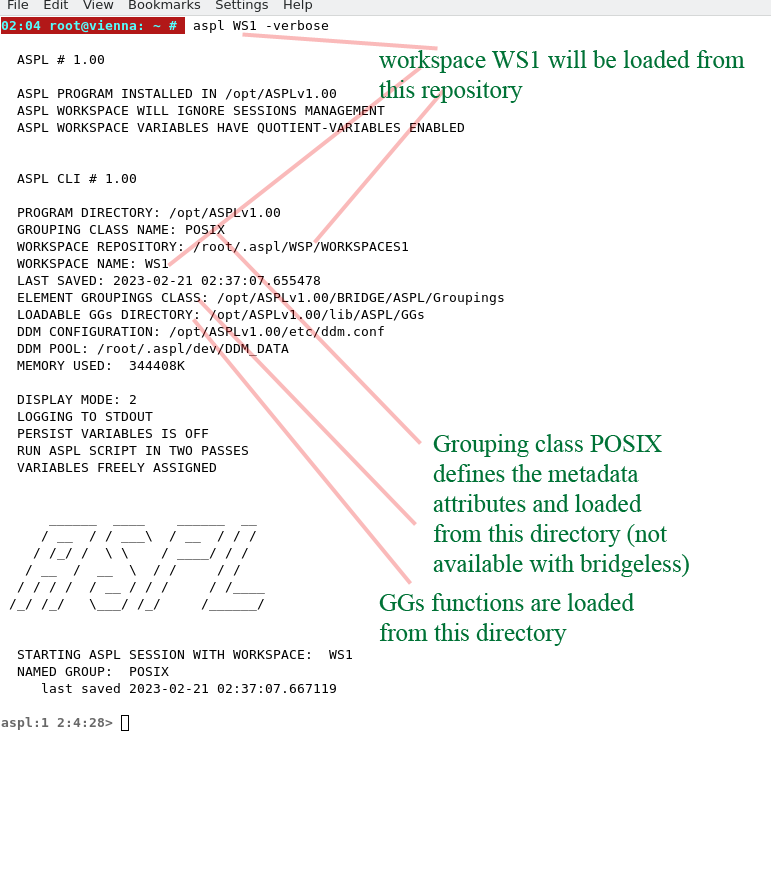
The startup of ASPL is explained in the following figure where the informational output has been labeled.
ASPL locates the WS1 workspace in the workspace repository /root/.aspl/WSP/WORKSPACES1. WS1 metadata has the POSIX as the grouping class of WS1, therefore ASPL will load POSIX class as the container of WS1. ASPL bridge is located in /opt/ASPLv1.00/BRIDGE/Groupings and this is where ASPL will load the grouping class container. The grouping functions GGs are located in /opt/ASPLv1.00/lib/ASPL/GGs. ASPL has two containers: a grouping class container, and a grouping functions container. Both containers are dynamic containers that is they are auto loadable by ASPL and the user is offered options to control these two containers.