ASPL User Guide v 1.00
© 2025 Bassem W. Jamaleddine
The ASPL interpreter provides a scripting language and it can parse, analyze, and execute the statement of an ASPL script. However, how to get the kernel to load the interpeter so that the later can execute the content of the script?
The shebang, the first line that appears in the script of an interpreted language, dictates the starting point where the kernel will dispatch the interpreter, once dispatched the interpreter takes control then it interprets the statements of the script. For this to happen, the script must be executable, then the kernel reads the first two bytes in the opening line of the script, should it be matching #! then it will call exec with whatever follows #! passing any extra arguments followed (and ending) with the name of the script. On the UNIX system such an exec will also pass the parent environment to the interpreter.
Typically, the env command is used on many systems to execute whatever follows it as being the interpreter program followed by the rest of the arguments then ending with the script name. However, the parsing of the shebang line has been problematic when dissected by different UNIX vendors and even by different releases of the same vendor.
The execution of an interpreter along its script content via the kernel is typically done in two ways:
The scripting language of an interpreter typically provides a mechanism to load its scripts via the kernel of the UNIX system. This can be done in two ways:
In either case the script is loaded through the UNIX shell environment. The first case requires specifying the full path to the location of the interpreter, and may not work on some UNIX systems where the loading of the #! has been disabled. The second case may seem simple, yet we need to pay special attention considering the many UNIX systems and the fact that env loading mechanism has not been addressed by POSIX (different vendors implement the env following their needs). Furthermore some vendors provide the -S option supposedly to be followed by a string to be split into the script name and its arguments, but fail the split and present the whole string as it is: one long string that is assumed to be the interpreter name (hence failing again with "no such script" when concatenating the arguments to the script name). In addition, the location of the env command may vary between systems: the env program may be located in /usr/bin, or /bin, or somewhere else.
Since all UNIX vendors (at least) load what follows the env as a single string pointing to the interpreter named program, then it is possible to generalize a solution to the loading of the interpreter and its arguments. To overcome the env loading issues and to make ASPL portable on different UNIX systems, ASPL uses a two-lines shebangs line: the first line is to read the interpreter name, and the second line is to pass the arguments of the program. Note that the script name is the program name itself and is implicitly passed by env as $0 shell variable.
This chapter shows some scripting examples that can be run by the ASPL interpreter. All scripts can be found in the shared folder where you have installed the ASPL interpreter.
■ Script throwdice.aspl
The following ASPL script simulates three players rolling dice on a craptable. You run the script at the UNIX prompt by following it by the number of throws. Line 1 and line 2 represent a two lines shebang to invoke the interpreter on the UNIX system. Lines 20 to 22 create three set variables, p1 p2 p3, and assign them to the grouping data created by the global grouping function ggdice().
1.     #!/usr/bin/env    aspl
2.     #ENVARG= -wsname TRANSIENT -groupingclass DICEGROUP
3.
4.     ;;***********************************************************************
5.     ;;   throwdice.aspl
6.     ;;   Simulate three players throwing dice on a craptable.
7.     ;;   ASPL, A Set Programming Language
8.     ;;   Copyright © 2021-2025 Bassem W. Jamaleddine
9.     ;;   All rights reserved.
10.    ;;***********************************************************************
11.
12.    endScriptIfShellArgsLessThan 1
13.
14.    displayoff
15.
16.    printblock SIMULATION FOR 3 PLAYERS THROWING DICE $1 TIMES ON A CRATABLE
17.
18.    ;;if $2 and $3 are not specified then ggthrowdice() set them to default 1 1
19.    p1 = ggthrowdice(player,player1,throws,$1,dieland1trials, 5 $2,dieland2trials, 3 $3)
20.    p2 = ggthrowdice(player,player2,throws,$1,dieland1trials, 5 $2,dieland2trials, 3 $3)
21.    p3 = ggthrowdice(player,player3,throws,$1,dieland1trials, 5 $2,dieland2trials, 3 $3)
22.
23.    ;; set ks vector
24.    ks faces face1 face2 entropy ppdd ffl aelm
25.
26.    displayon
27.
28.    printblock SHOW THE THROW NUMBERS WHEN p1 AND p2 HAVE ABSOULTELY THE SAME OUTCOME
29.    fU`ks= p1 p2
30.    ;;    similarities on throw number (ffl) along the ks (z) vector
31.
32.    printblock SIMILARITY WHEN p1 AND p2 HAVE ABSOULTELY THE SAME OUTCOME
33.    sim`fflz p1 p2
34.
35.    printblock SHOW THE THROW NUMBERS WHEN ALL 3 PLAYERS HAVE ABSOULTELY THE SAME OUTCOME
36.    fU`ks= p1 p2 p3
37.    ;; similarities on throw number (ffl) along the ks (z) vector
38.
39.    printblock SIMILARITY WHEN ALL 3 PLAYERS HAVE ABSOULTELY THE SAME OUTCOME
40.    sim`fflz p1 p2 p3
41.
42.    ks dicesum ppdd ffl aelm
43.    printblock SHOW THE THROW NUMBERS WHEN ALL 3 PLAYERS HAVE THE SAME SUM
44.    fU`ks= p1 p2 p3
45.
46.    printblock SIMILARITY WHEN ALL 3 PLAYERS HAVE SAME SUM
47.    sim`fflz p1 p2 p3
48.
49.    ks diceord ppdd ffl aelm
50.    printblock SHOW THE THROW NUMBERS WHEN p1 AND p2 HAVE THE SAME DICE LANDING ORDER
51.    fU`ks= p1 p2
52.
53.
54.    endscript
55.
56.    __END__
57.
58.    $00 must be followed by three arguments:
59.              number of throws, retrial on one die, retrial on the other die
60.
61.       This script does the simulation of three players throwing dice on a craptable.
62.       The script takes three arguments representing the number of throws, the number
63.       of retrials for a specific face on one die, and the number of retrials for a
64.       specific face on the other one.
65.       Set the retrials to 1 and 1 for a fair dice roll.
66.       Increasing the retrials cause the similarity to increase and the entropy to
67.       decrease (since certainty is higher when bias increases).
68.       The script prints the result of all three players that have the same sum, and also
69.       prints when they have absolutely the same outcome (on both faces of the dice).
70.
71.       simulate 900 throws for the three players
72.     (1)     $00 900
73.
74.       simulate 900 throws for the three players retrying once each of the die
75.     (2)     $00 900 1 1
76.
77.     (1) and (2) are equivalent as the throws are fair and not biased
78.
79.       simulate 900 throws for the three players retrying 3 times the 1st landing die
80.       and 4 times the other
81.          $00 900 3 4
82.       increase the retrials and the entropy will decrease as the certainty increases,
83.       since it is more likely to guess the outcome.
84.
85.       NOTE: * to see the script trace as it is being processed by the interpreter
86.             add the -SCT option on the command line, for example:
87.                $00 100  -SCT
88.                $00 100 3 5  -SCT
89.
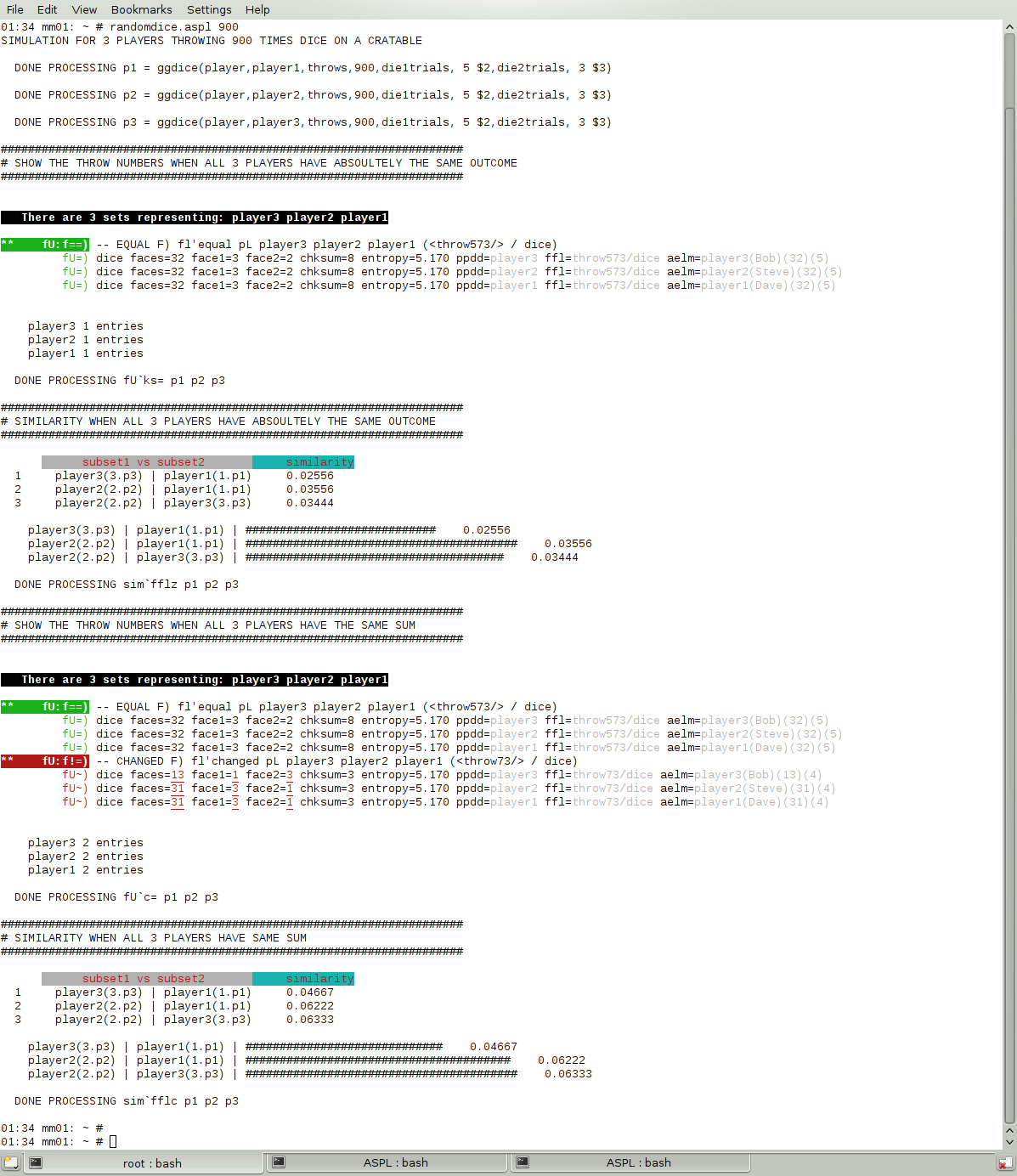
Say we want to do the simulation for three players tossing a pair of dice nine hundred times:
# throwdice.aspl 900 1 1
The following simulation is repeated with retrials. Say we want to do the simulation for three players tossing a pair of dice nine hundred times with unfair retrials:
# throwdice.aspl 900 4 3
ENABLING ASPL SCRIPT TRACING FACILITY
You can enable ASPL script tracing facility by adding the option -SCT
at the end of command prompt. For example:
throwdice.aspl 300 -SCT
The simulation is repeated for 300 throws and the ASPL script tracing facility is enabled (by adding the option -SCT at the end of the command prompt).
You can enable ASPL script tracing facility by adding the option -SCT
at the end of command prompt. For example:
throwdice.aspl 300 -SCT
# throwdice.aspl 300 -SCT
The following figure shows the result of the simulation when three players are tossing dice: find the events when all the three players have the same outcome.