ASPLMQ User Guide v 1.00
© 2026 Bassem W. Jamaleddine
Similar to IBM MQ queue configurations, channel objects share a regular structure that can be parsed efficiently using regular expressions. Filtering these channel objects is achieved with the Perl code shown in Figure 1.3.1.
The program reads STDIN into the scalar variable $s and splits the string into segments that start with DEFINE CHANNEL and end with REPLACE, converting each into an object reference $o. The object is constructed using the Perl map function, extracting each channel name with cn(). The bulk of the parsing work is done within this map statement; reading the expression from x right to left details its functional transformation steps:
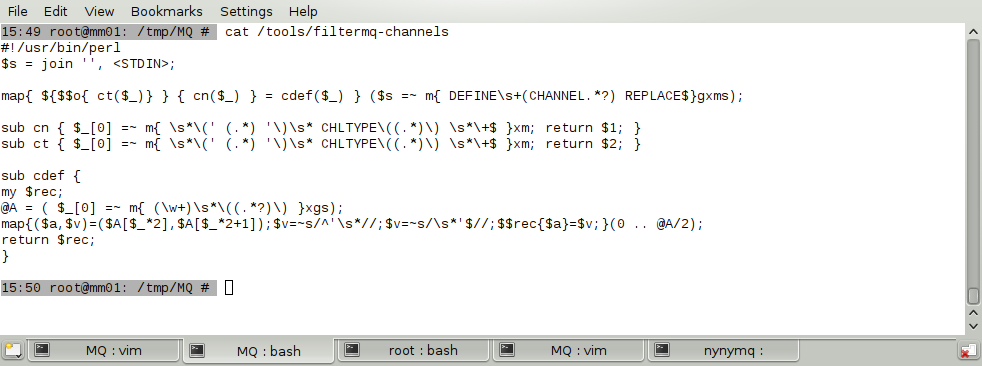
map{ ${$$o{ ct($_)}} {cn($_)} = cdef($_) } ($s =~ m{ DEFINE\s+(CHANNEL.*?) REPLACE$}gxms);

                                            Break the string into pieces where
                                            each piece starts with DEFINE CHANNEL
                                            and end with REPLACE.
              	        Call cdef() on each piece
                        mapping a left attribue to
                        its right value
Aggregate each derived
channel type ct() and
channel name cn() into the
object $o and make the
${$$o{ ct($_)}} {cn($_)}
points to its derived structure
Listing 1.3.1 shows the filtermq-channels script. For clarity, this version spreads the regular expressions across multiple lines and expands the map function inside the cdef() routine into an explicit for loop.
1.     #!/usr/bin/perl
2.     use strict;
3.
4.     my $s = join '', <STDIN>;
5.
6.     my(@QC) = ($s =~
7.             m{
8.                 DEFINE\s+(CHANNEL.*?)
9.                 REPLACE$
10.            }gxms
11.            );
12.
13.    my $o;
14.    map { ${ $$o{ ct($_) } } { cn($_) } =  cdef($_) } @QC;
15.
16.    sub cn {
17.    my $s = shift;
18.    $s =~ m{
19.    \s*\('
20.    (.*)
21.    '\)\s*
22.    CHLTYPE\((.*)\)
23.    \s*\+$
24.    }xm;
25.    return $1;
26.    }
27.
28.    sub ct {
29.    my $s = shift;
30.    $s =~ m{
31.    \s*\('
32.    (.*)
33.    '\)\s*
34.    CHLTYPE\((.*)\)
35.    \s*\+$
36.    }xm;
37.    return $2;
38.    }
39.
40.
41.    sub cdef {
42.    my $s = shift;
43.    my $rec;
44.
45.    my (@A) = (
46.        $s =~
47.            m{
48.                 (\w+)\s*\((.*?)\)
49.            }xgs
50.    );
51.
52.    for (my $i=0; $i<@A; $i+=2) {
53.        my ($att,$v)=($A[$i],$A[$i+1]);
54.        $v =~ s/^'\s*//; $v =~ s/\s*'$//;
55.        $$rec{$att} = $v;
56.    }
57.    return $rec;
58.    }
59.
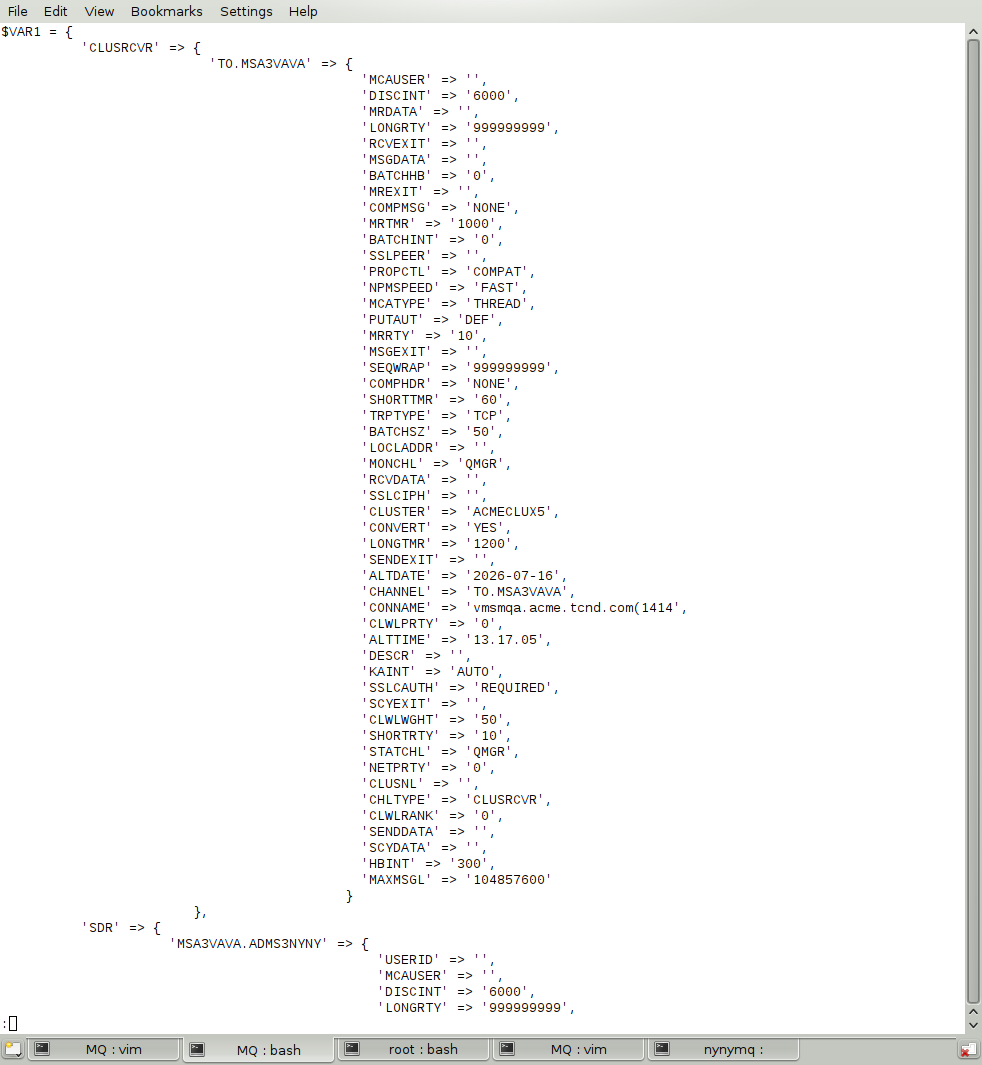
The ACMECO queue manager configuration can be dumped using saveqmgr and piped to filtermq-channels to aggregate the channel objects into the $o object reference.
# ssh -q mqm@vavamq /home/mqm/mqtools/saveqmgr -m ACMECO -s -c 2>&1 | filtermq-channels
# cat ACMECO.saveqmgr | filtermq-channels
■ Printing Formatted Reports for IBM MQ Channels
Adding a formatting function allows the script to print the channels in a tabulated report. Listing 1.3.2 shows the updated filtermq-channels script with this function included.
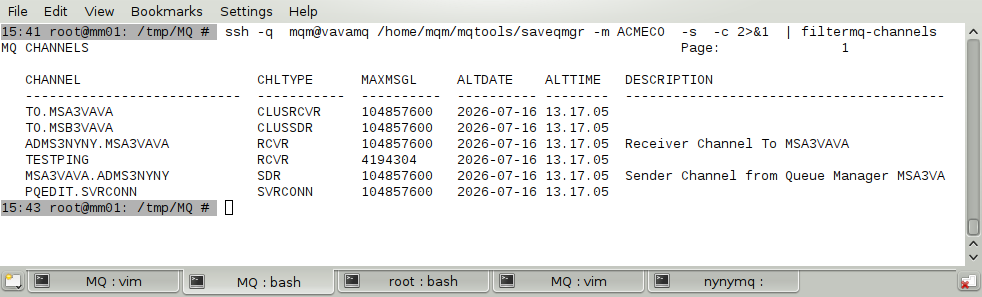
The resulting tabulated report displaying the channel configurations is illustrated in Figure 1.3.3.1. #!/usr/bin/perl 2. use strict; 3. 4. my $s = join '', <STDIN>; 5. 6. my(@QC) = ($s =~ 7. m{ 8. DEFINE\s+(CHANNEL.*?) 9. REPLACE$ 10. }gxms 11. ); 12. my $o; 13. map { ${ $$o{ ct($_) } } { cn($_) } = cdef($_) } @QC; 14. 15. chout($o); 16. 17. sub cn { 18. my $s = shift; 19. $s =~ m{ 20. \s*\(' 21. (.*) 22. '\)\s* 23. CHLTYPE\((.*)\) 24. \s*\+$ 25. }xm; 26. return $1; 27. } 28. 29. sub ct { 30. my $s = shift; 31. $s =~ m{ 32. \s*\(' 33. (.*) 34. '\)\s* 35. CHLTYPE\((.*)\) 36. \s*\+$ 37. }xm; 38. return $2; 39. } 40. 41. sub cdef { 42. my $s = shift; 43. my $rec; 44. 45. my (@A) = ( 46. $s =~ 47. m{ 48. (\w+)\s*\((.*?)\) 49. }xgs 50. ); 51. 52. for (my $i=0; $i<@A; $i+=2) { 53. my ($att,$v)=($A[$i],$A[$i+1]); 54. $v =~ s/^'\s*//; $v =~ s/\s*'$//; 55. $$rec{$att} = $v; 56. } 57. return $rec; 58. } 59. 60. ################################# 61. sub chout { 62. my ($chrec) = @_; 63. my($CHANNEL,$CHLTYPE,$MAXMSGL,$ALTDATE,$ALTTIME,$DESCRIPTION); 64. format STDOUT_TOP = 65. MQ CHANNELS Page: @>>>>>>>>>>>>>> 66. $% 67. 68. CHANNEL CHLTYPE MAXMSGL ALTDATE ALTTIME DESCRIPTION 69. --------------------------- ----------- ---------- ---------- -------- ---------------------------------------- 70. . 71. format STDOUT = 72. @<<<<<<<<<<<<<<<<<<<<<<<<<< @<<<<<<<<<< @<<<<<<<<< @<<<<<<<<< @<<<<<<<< @<<<<<<<<<<<<<<<<<<<<<<<<<<<<<<<<<<<<<<< 73. $CHANNEL,$CHLTYPE,$MAXMSGL,$ALTDATE,$ALTTIME,$DESCRIPTION 74. . 75. 76. $== 30; 77. $-= 0; 78. $^L= "\nCHANNELS DEFINED ON QMGR\n\n"; 79. 80. 81. foreach my $ct (sort keys %$chrec) { 82. foreach my $cn (sort keys %{$chrec->{$ct}}) { 83. $CHANNEL = $cn; 84. ($CHANNEL, $CHLTYPE,$MAXMSGL, $ALTDATE, $ALTTIME, $DESCRIPTION) = 85. map(${${$$chrec{$ct}}{$cn}}{$_}, qw(CHANNEL CHLTYPE MAXMSGL ALTDATE ALTTIME DESCR)); 86. $DESCRIPTION //= ""; 87. write; 88. } 89. } 90. $- = 0; 91. }
Parsing IBM MQ queue and channel configurations is handled by the MQparser.pm Perl module. To monitor modifications within an IBM MQ topology, the ASPL interpreter loads MQutils::MQparser as part of its library. Refer to the appendix The module MQutils::MQparser to Parse IBM MQ Objects for the full source file.