ASPLMQ User Guide v 1.00
© 2026 Bassem W. Jamaleddine
Visual comparisons for IBM MQ queue configuration drift are rendered by applying ASPL operators to the differential group variables representing the queues. Additionally, ASPL monitoring operators can trigger real-time email alerts to notify designated recipients. This section explains how to use ASPL to detect queue changes within a clustered IBM MQ qmgr. The first part introduces the clustered_delta_queues.aspl script, which detects changes in the queues across the group union of the clustered TESTA qmgr installed on hosts nynymq and vavamq. The second part details the usage of the ASPL playchanges command with differential group variables to visualize queue configuration changes over time. The third part introduces the monitor_clustered_delta_queues.aspl script, which performs the same change detection but also sends automated email reports to designated recipients.
The scripts and ASPL sessions discussed in this section depend on the element grouping class IBMMQ_QUEUES_GROUP created in section "Grouping Class for IBM MQ Queue Attributes".
ACME Co. configured the TESTA queue manager on hosts nynymq and vavamq. Initially, the queue objects on both hosts must be identical. Validate this configuration by displaying the similarity score and any configuration drift between the queue objects on both hosts:
# queuescompare.pl -hostqmgr nynymq:TESTA -hostqmgr vavamq:TESTA -view simz
# queuescompare.pl -hostqmgr nynymq:TESTA -hostqmgr vavamq:TESTA -view simz -ks+ ALTTIME
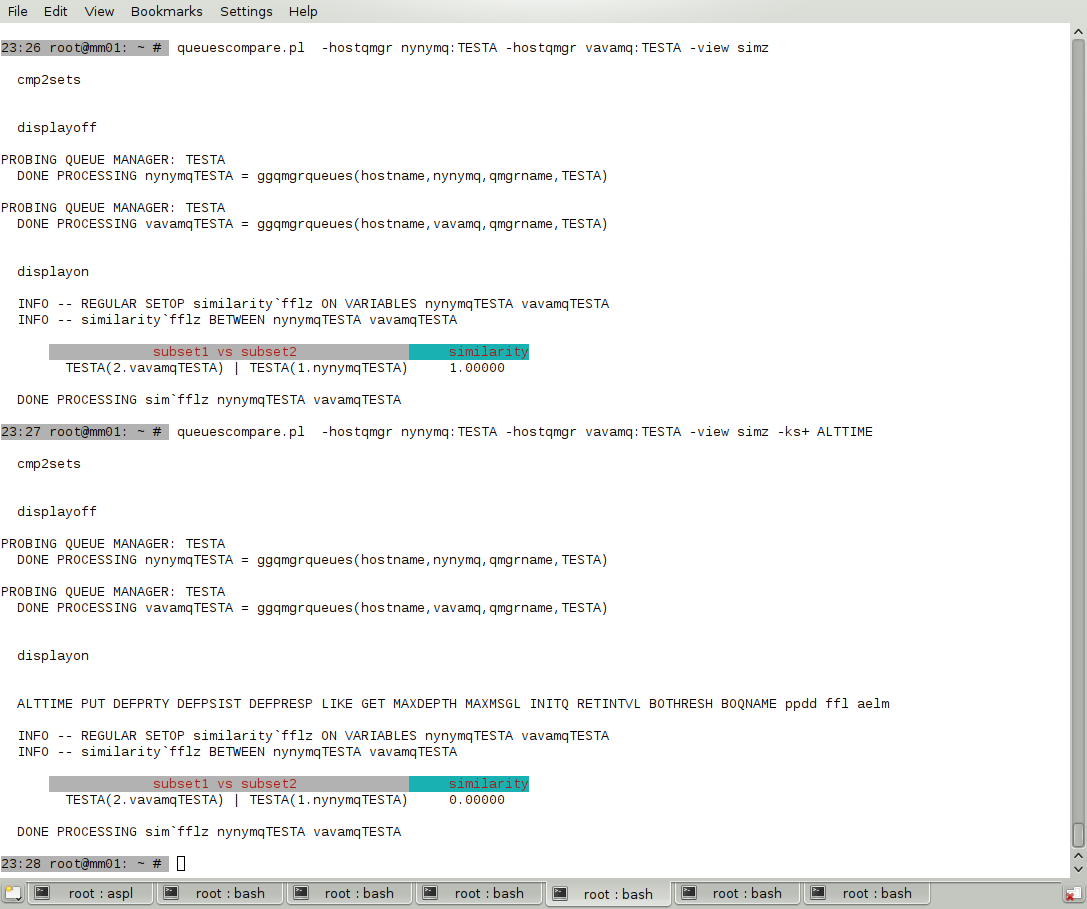
The following command compares the queue configurations of the TESTA qmgr across both hosts:
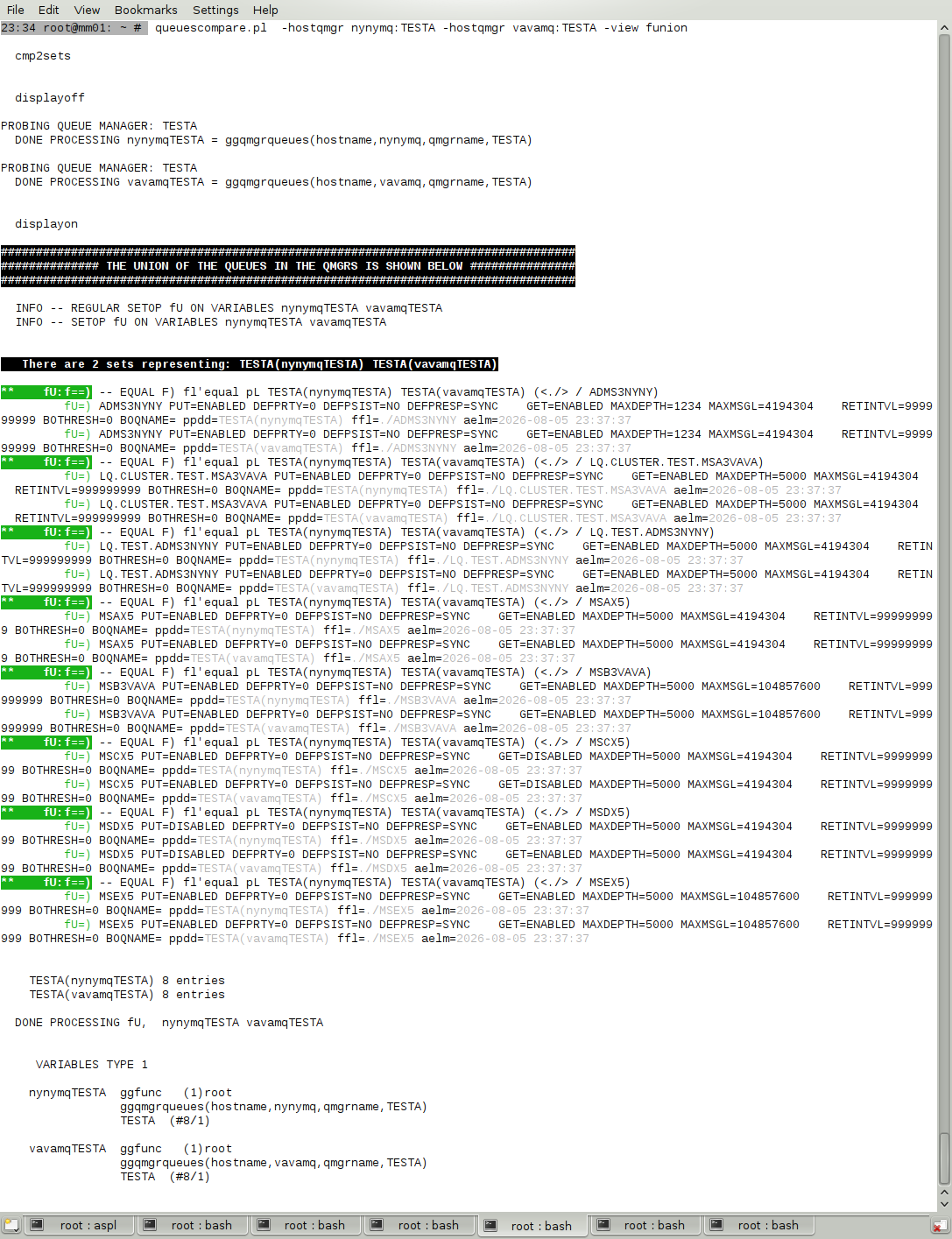
# queuescompare.pl -hostqmgr nynymq:TESTA -hostqmgr vavamq:TESTA -view funion
To demonstrate the effect of adding ALTTIME to the ks-vector, Figure 3.2.3 displays all queue names in red. This visual coloring reflects the 0.0 similarity score previously shown in Figure 3.2.1, where the mismatching timestamps render the elements completely dissimilar.
# queuescompare.pl -hostqmgr nynymq:TESTA -hostqmgr vavamq:TESTA -view funion -ks+ ALTTIME
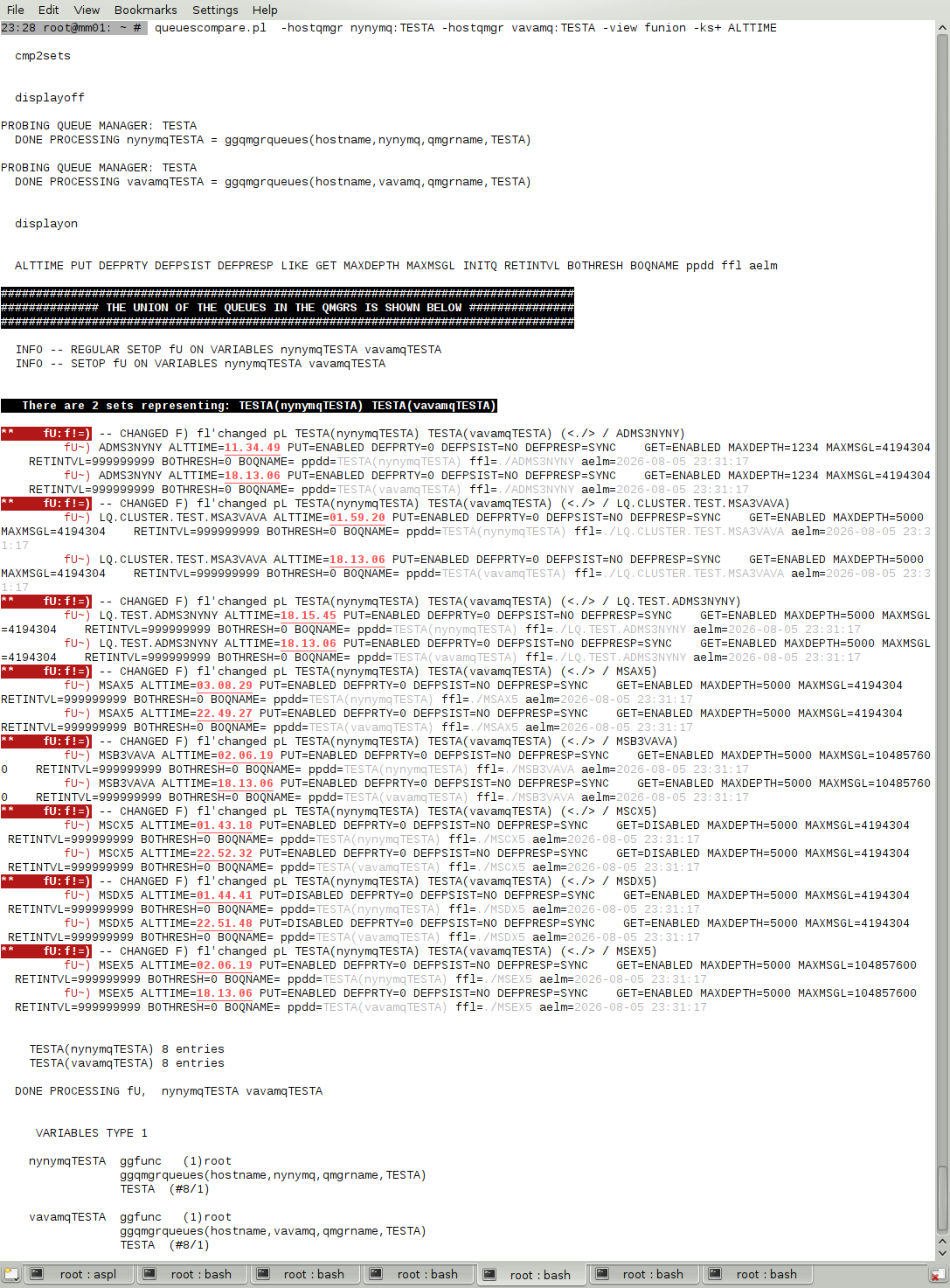
Display 3.2.1 details the ASPL commands executed by the queuescompare.pl script when comparing the clustered TESTA qmgr prior to modifying any queues.
# queuescompare.pl -hostqmgr nynymq:TESTA -hostqmgr vavamq:TESTA -view funion
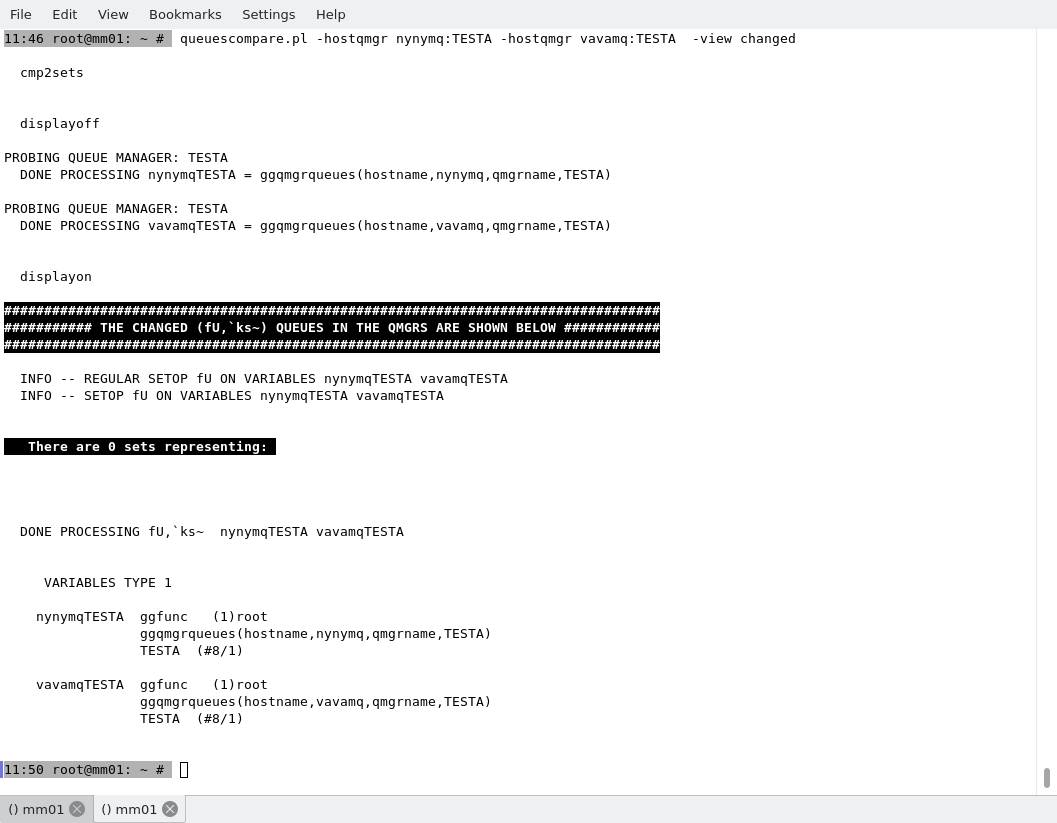
The group union of the queues appears entirely in green, indicating a perfect configuration match between the queue managers. Run queuescompare.pl with the -view changed option to confirm that no configuration modifications have occurred within the queues of the clustered TESTA qmgr.
# queuescompare.pl -hostqmgr nynymq:TESTA -hostqmgr vavamq:TESTA -view changed
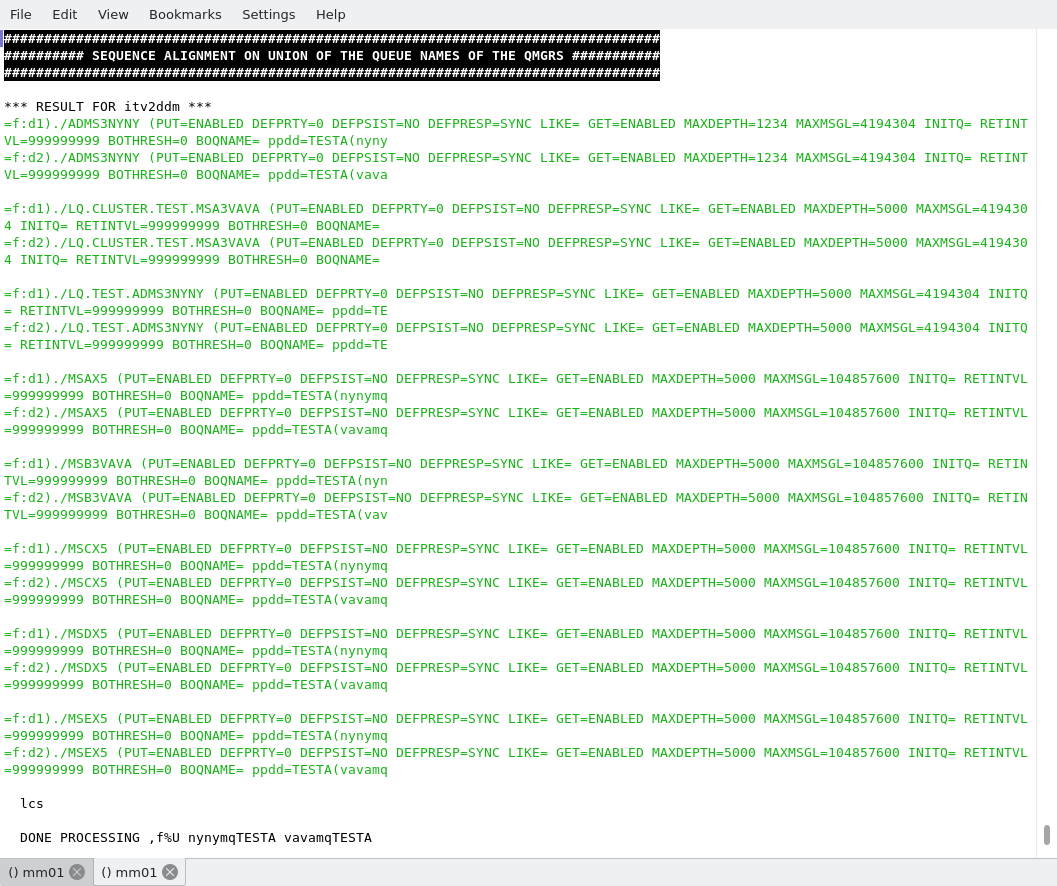
An alignment comparison between the queues of the clustered TESTA queue manager is displayed using the following command:
# queuescompare.pl -hostqmgr nynymq:TESTA -hostqmgr vavamq:TESTA -view useq
■ Detecting Queue Configuration Changes in a Clustered Qmgr
The clustered_delta_queues.aspl script, shown in Listing 3.2.1, detects configuration changes within the queues of the clustered TESTA qmgr. You will edit the script clustered_delta_queues.aspl in ASPL's shared directory.
# vi `asplcmd ~shared`/clustered_delta_queues.aspl
1.     #!/usr/bin/env  aspl
2.     #ENVARG= -wsname CLUSTERED_TESTA_QUEUES -groupingclass IBMMQ_QUEUES_GROUP
3.
4.     ;;***********************************************************************
5.     ;;   clustered_delta_queues.aspl
6.     ;;   detect changes in IBM MQ queue attributes in a cluster of qmgrs.
7.     ;;   Assuming the qmgr TESTA is installed on hosts NYNYMQ and VAVAMQ
8.     ;;
9.     ;;   Copyright © 2021-2026 Bassem W. Jamaleddine
10.    ;;   All rights reserved.
11.    ;;
12.    ;;***********************************************************************
13.
14.    ;; Before running the script, a first initialization of group variable
15.    ;; captures is required. The script interrogates the set variables
16.    ;; detecting changes in an incremental change of data configuration.
17.    ;; # aspl -wsname CLUSTERED_TESTA_QUEUES -groupingclass IBMMQ_QUEUES_GROUP
18.    ;;     aspl > nytesta = ggqmgrqueues(hostname,nynymq,qmgrname,TESTA)
19.    ;;     aspl > vatesta = ggqmgrqueues(hostname,vavamq,qmgrname,TESTA)
20.    ;; NOTE: below fU, is used so to labinate group label, since grp1 is
21.    ;;       uc(qmgrname) in ggqmgrqueues(), and qmgrnames are the same
22.    ;;       in a cluster of hosts.
23.    ;;     aspl > nyvatesta = fU, nytesta vatesta
24.
25.    endScriptIfShellArgsLessThan 1
26.
27.    ks-  TRIGDATA PROCESS INITQ ALTDATE ALTTIME chksum
28.
29.    printblock ANY CHANGES IN THE QMGRs ATTRIBUTES OF $1 ARE SHOWN BELOW
30.
31.    ?? $1
32.    ;; view only these have changed
33.    fU,`ks~  @$1
34.
35.    ;; view all whether changed or not
36.    ;;fU,  @$1
37.
38.    intermittentarc 1
39.    ;; playop on differential group variable showing only these have changed
40.    playop fU,`ks~ $1
41.    ;; playop showing them all whether changed or not
42.    ;;playop fU, $1
43.
44.    ;; quietly have labinated union of group variable on top of answer stack
45.    displayoff
46.    fU,`ks~ @$1
47.    displayon
48.
49.    setwriteformat MQ_Writer_QueuesColor
50.    writeformat
51.    ;;writeformatonchanges
52.
53.    saveonchanges
54.
55.    endscript
56.
57.    __END__
58.
59.    $00 detects changes in the queues attributes of IBM MQ qmgr at ACME Co.
60.    The qmgr TESTA is created on two hosts: nynymq and vavamq; it is
61.    assumed to be a clustered qmgr. Using ASPL group union, we can monitor
62.    changes in the clustered queues TESTA.
63.    The nyvatesta is the group variable that represents queues in both qmgrs
64.    installed on hosts NYNYMQ and VAVAMQ, that is: nyvatesta = fU, nytesta vatesta
65.
66.       You must provide the grouping variable for the qmgr or gmgrs
67.          nytesta   for queues of qmgr TESTA hosted on NYNYMQ
68.          vatesta   for queues of qmgr TESTA hosted on VAVAMQ
69.          nyvatesta for queues of qmgr TESTA hosted on NYNYMQ and VAVAMQ
70.
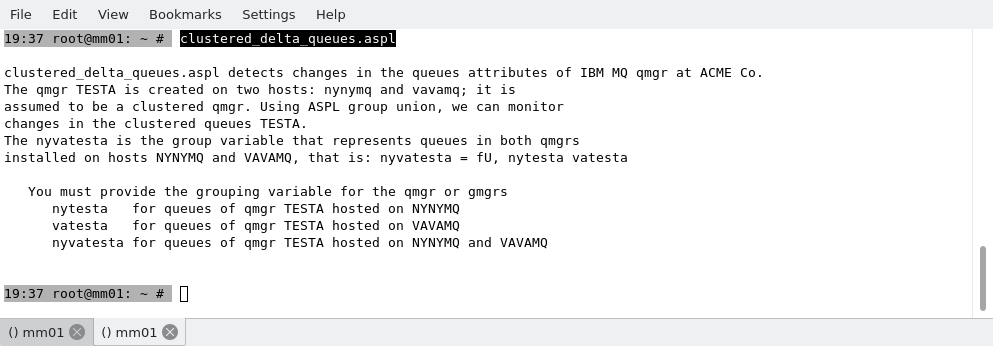
Running the clustered_delta_queues.aspl script without arguments displays its usage instructions.
Prior to script execution, capture the baseline queue configurations for the clustered TESTA qmgr across both hosts. This requires separate identifiers for the TESTA instances on nynymq and vavamq. Initialize the ASPL session by creating the namedspace CLUSTERED_TESTA_QUEUES under IBMMQ_QUEUES_GROUP element grouping class. Then, define the nytesta and vatesta set variables within the session to hold the initial configuration of the queues in TESTA qmgr for nynymq and vavamq respectively.
# aspl -wsname CLUSTERED_TESTA_QUEUES -groupingclass IBMMQ_QUEUES_GROUP
aspl> nytesta = ggqmgrchann(hostname,nynymq,qmgrname,TESTA)
aspl> vatesta = ggqmgrchann(hostname,vavamq,qmgrname,TESTA)
aspl> nyvatesta = fU, nytesta vatesta
the group variable represents the queues in both qmgrs
aspl> bye
bye will save the workspace before leaving the ASPL interpreter
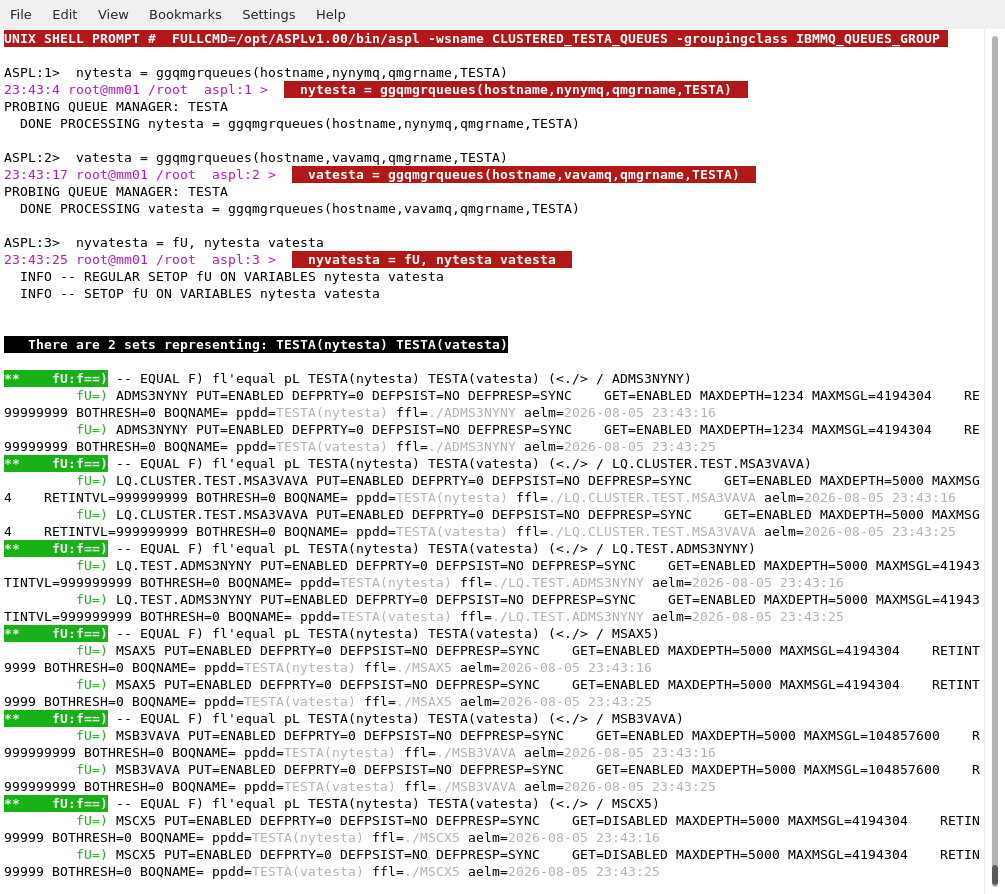
Figure 3.2.7 illustrates the output of the following ASPL statement:
aspl> nyvatesta = fU, nytesta vatesta
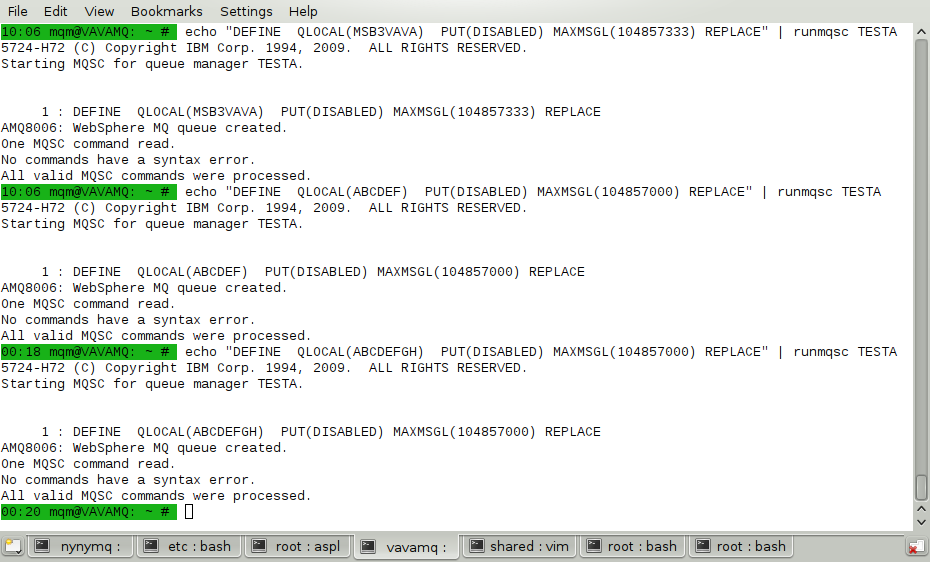
Testing the script requires modifying the queue configurations. The following commands apply four changes to the queues of the TESTA queue manager hosted on vavamq:
(vavamq's qmgr:TESTA) 19:38 mqm@vavamq: ~ # echo "DEFINE QLOCAL(MSAX5) GET(DISABLED) MAXMSGL(4194111) REPLACE" | runmqsc TESTA
22:52 mqm@VAVAMQ: ~ #  echo "DEFINE  QLOCAL(MSAX5)  GET(DISABLED) MAXMSGL(4194111) REPLACE" | runmqsc TESTA
5724-H72 (C) Copyright IBM Corp. 1994, 2009.  ALL RIGHTS RESERVED.
Starting MQSC for queue manager TESTA.

     1 : DEFINE  QLOCAL(MSAX5)  GET(DISABLED) MAXMSGL(4194111) REPLACE
AMQ8006: WebSphere MQ queue created.
One MQSC command read.
No commands have a syntax error.
All valid MQSC commands were processed.
(vavamq's qmgr:TESTA) 00:36 mqm@vavamq: ~ # echo "DELETE QLOCAL(MSB3VAVA)" | runmqsc TESTA
5724-H72 (C) Copyright IBM Corp. 1994, 2009.  ALL RIGHTS RESERVED.
Starting MQSC for queue manager TESTA.

     1 : DELETE  QLOCAL(MSB3VAVA)
AMQ8007: WebSphere MQ queue deleted.
One MQSC command read.
No commands have a syntax error.
All valid MQSC commands were processed.
(vavamq's qmgr:TESTA) 00:37 mqm@vavamq: ~ # echo "DEFINE QLOCAL(MSAX5) GET(DISABLED) MAXMSGL(104857600) REPLACE" | runmqsc TESTA
5724-H72 (C) Copyright IBM Corp. 1994, 2009.  ALL RIGHTS RESERVED.
Starting MQSC for queue manager TESTA.

     1 : DEFINE  QLOCAL(MSAX5)  GET(DISABLED) MAXMSGL(104857600) REPLACE
AMQ8006: WebSphere MQ queue created.
One MQSC command read.
No commands have a syntax error.
All valid MQSC commands were processed
(vavamq's qmgr:TESTA) 00:37 mqm@vavamq: ~ # echo "DEFINE QLOCAL(MSB3VAVA) PUT(DISABLED) MAXMSGL(104857222) REPLACE" | runmqsc TESTA
00:52 mqm@VAVAMQ: ~ #  echo "DEFINE  QLOCAL(MSB3VAVA)  PUT(DISABLED) MAXMSGL(104857222) REPLACE" | runmqsc TESTA
5724-H72 (C) Copyright IBM Corp. 1994, 2009.  ALL RIGHTS RESERVED.
Starting MQSC for queue manager TESTA.

     1 : DEFINE  QLOCAL(MSB3VAVA)  PUT(DISABLED) MAXMSGL(104857222) REPLACE
AMQ8006: WebSphere MQ queue created.
One MQSC command read.
No commands have a syntax error.
All valid MQSC commands were processed.
Display 3.2.3 illustrates the four configuration changes made to the queues of the TESTA queue manager hosted on vavamq.
Following each modification, the clustered_delta_queues.aspl script was invoked against the nyvatesta set variable.
# clustered_delta_queues.aspl nyvatesta
Display 3.2.3 illustrates the ASPL statements executed by the clustered_delta_queues.aspl script against the nyvatesta set variable. The script iterates through its internal commands four times — once for each recorded configuration change.
Figure 3.2.6 illustrates the modifications captured in the nyvatesta differential group variable. These variations result from executing the playop operator on the group union of elements with mismatching attributes.
aspl> playop fU`ks~ nyvatesta
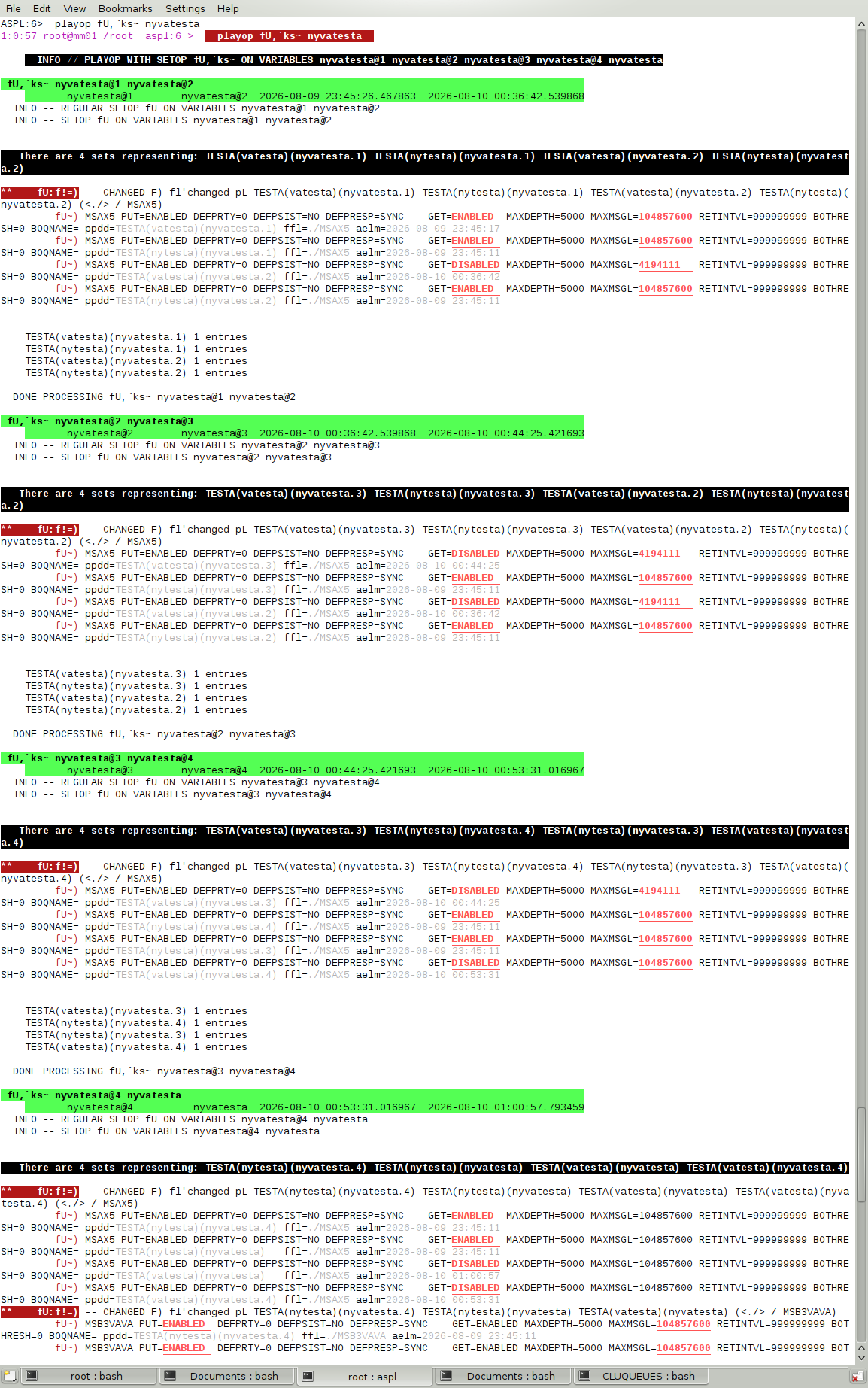
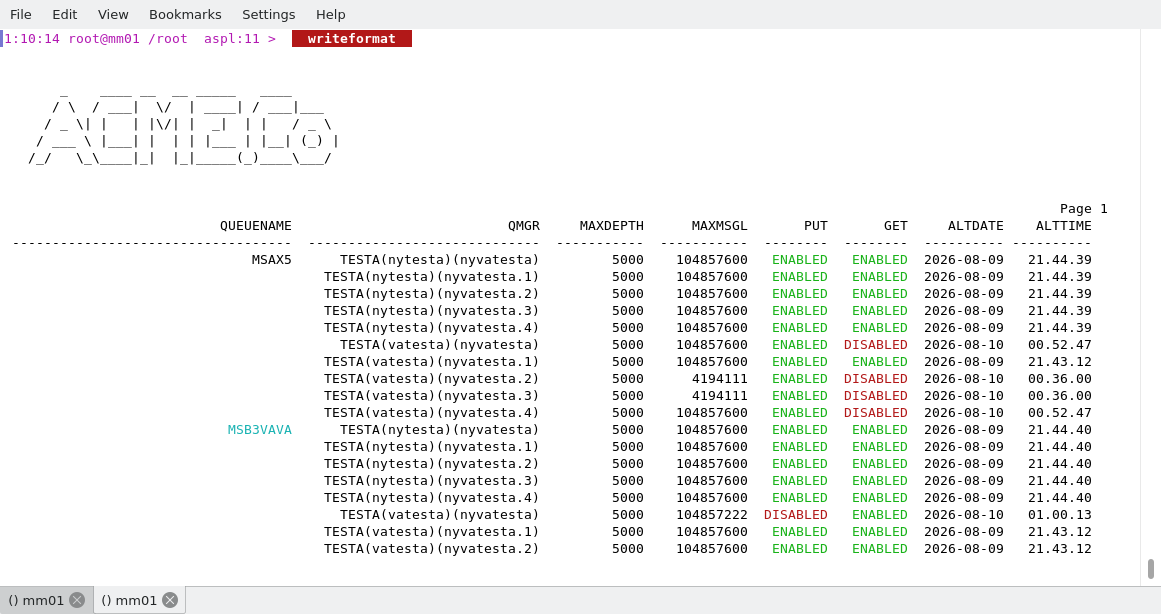
Figure 3.2.7 shows the prettyprint report of the queues in the differential group variable nyvatesta.
To summarize the modifications, Display 3.2.4 illustrates an ASPL session initialized by loading the CLUSTERED_TESTA_QUEUES namespace. The ASPL statements issued here mirror those following the fourth configuration change in Display 3.2.3, except for the report printed by the writer. In Display 3.2.4, the statement preceding the writer is:
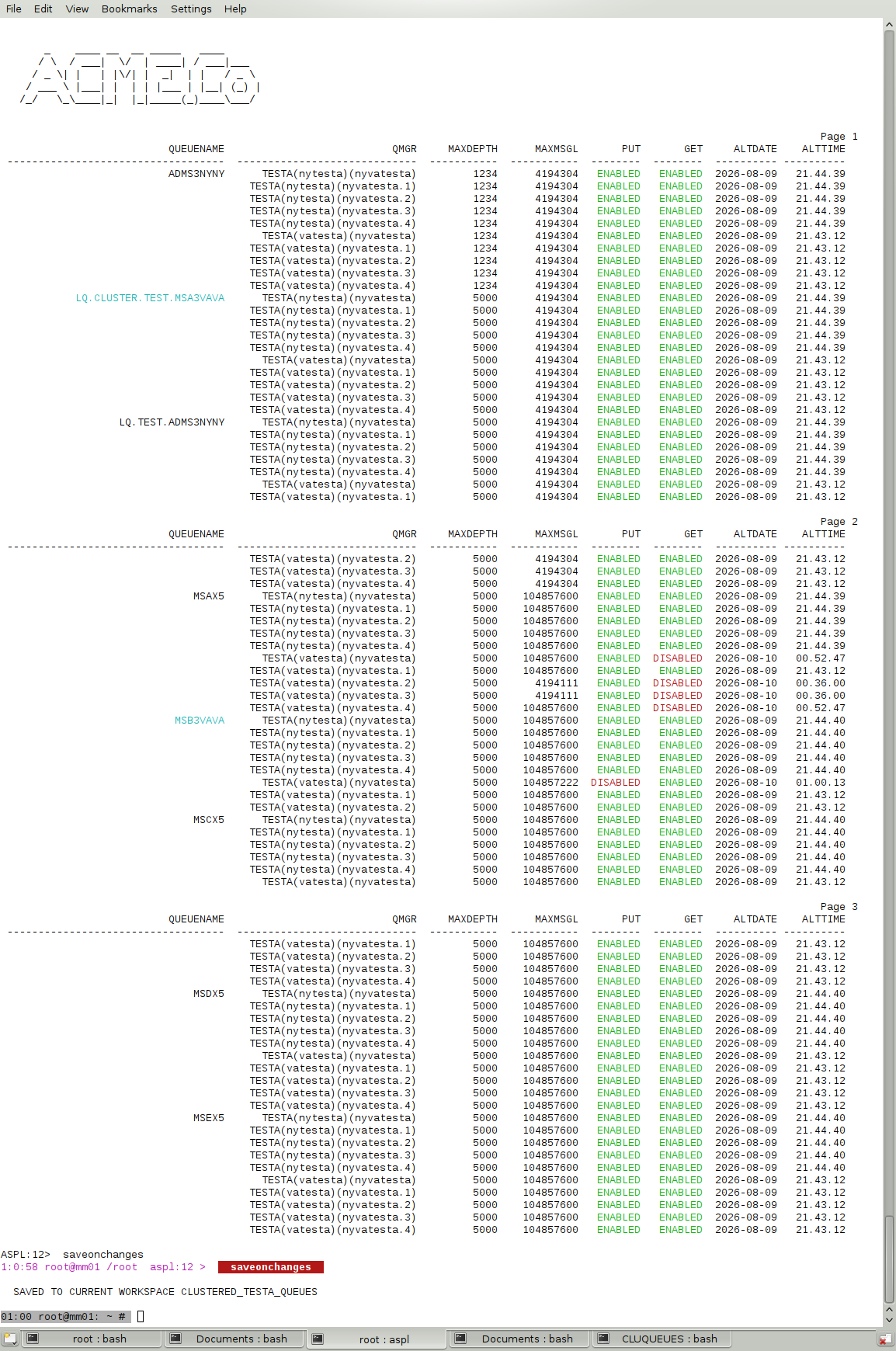
aspl> fU,`ks~ @nyvatesta
`ks~ is read: such that the ks-vector is different.
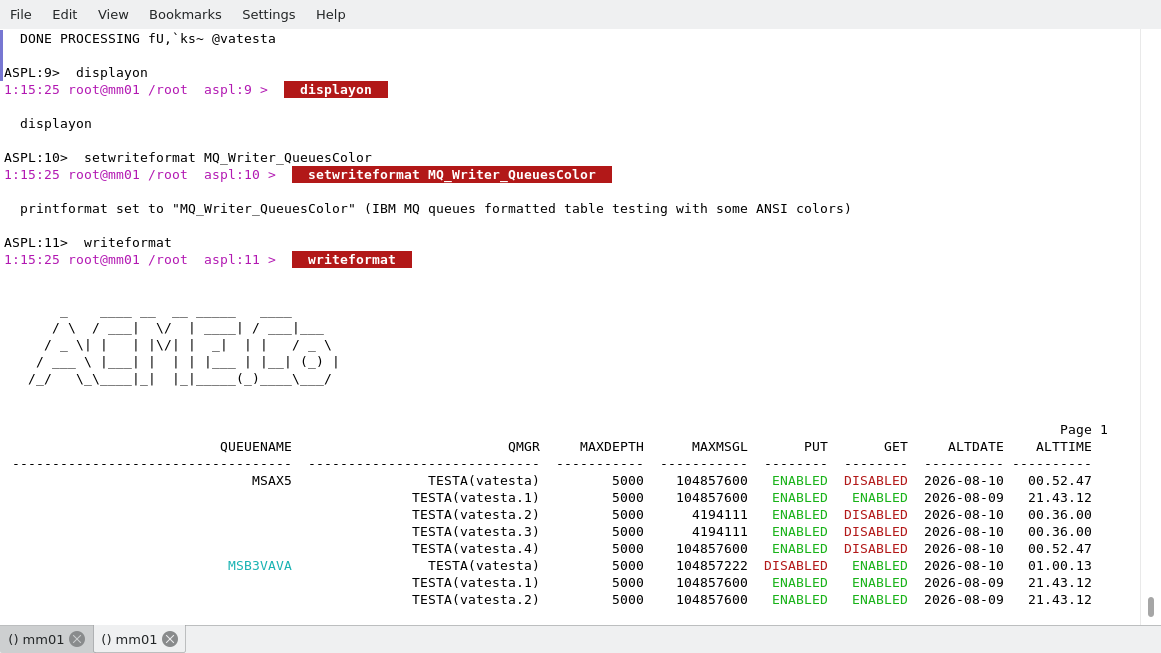
Unlike Display 3.2.3, where the fU, @nyvatesta statement aggregates the group union of all historical states regardless of modifications, this statement filters the output to show only active changes.
Refer to ASPL Operations Guide for more information on ASPL ticked operations.Figure 3.2.10 shows the report for only these changed states (queues) due to fU,
`ks~ @nyvatesta. Compare it
to Figure 3.2.7 that shows the cumulative states (queues) due to fU, @nyvatesta.
Because nyvatesta depends on the nytesta and vatesta variables, the ASPL interpreter also treats these variables as differential group variables. Consequently, a configuration change in nyvatesta implies a state modification in one or both of these variables. Display 3.2.5 illustrates the output of the clustered_delta_queues.aspl script when executed against them. Viewing the state modifications of the vatesta set variable exposes the vertical variation within the queues of the TESTA queue manager hosted on vavamq, and the same behavior applies to the nytesta variable.
Viewing state modifications within the vatesta differential group variable reveals the vertical configuration drift for the TESTA queue manager hosted on vavamq. The same behavior applies to the nytesta set variable. Figure 3.2.11 illustrates this vertical variation within vatesta in the report generated by the following command:
# clustered_delta_queues.aspl vatesta
■ Playing the differential group variable to view changes in the queues of qmgr TESTA chronogically
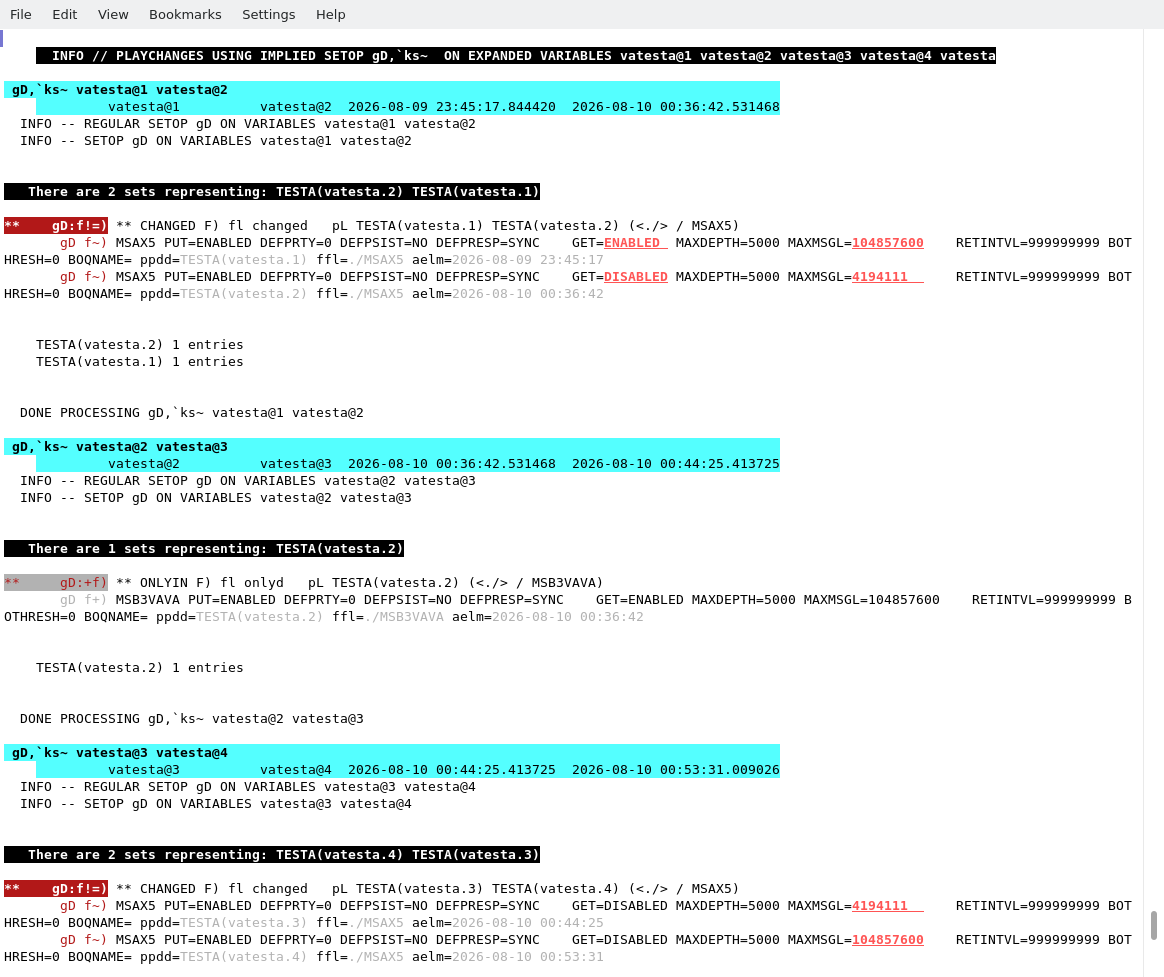
In ASPL, executing the playchanges operator against a differential group variable displays its historical state modifications over time. For example, run the following command to view the four recorded changes within the vatesta differential group variable, which tracks the queue configurations for the TESTA queue manager hosted on vavamq:
# asplcmd "load CLUSTERED_TESTA_QUEUES; intermittentarc 1; playchanges vatesta"
To clearly view configuration changes for the queues of TESTA queue manager hosted on vavamq, initialize an ASPL session by loading the namedspace CLUSTERED_TESTA_QUEUES. Then, execute the playchanges operator against the vatesta differential group variable, as illustrated in Display 3.2.6.
■ Sending Email Notification on Queue Configuration Change
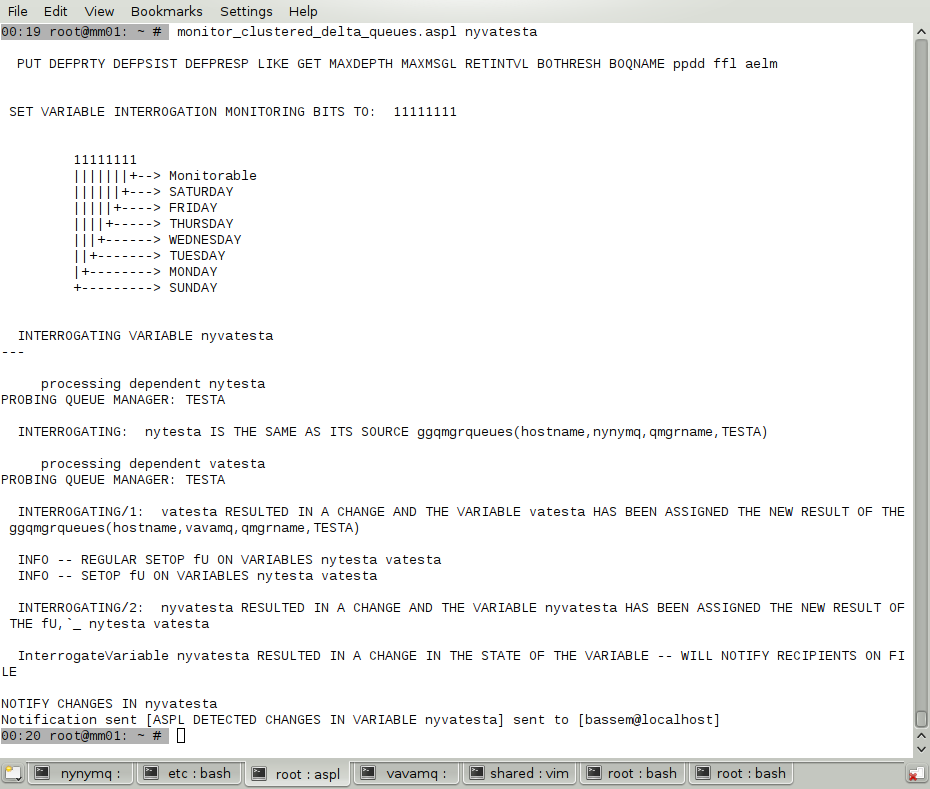
The ASPL varchangenotify command detects modifications within group data and transmits notifications to a designated list of email addresses. The monitor_clustered_delta_queues.aspl script, shown in Listing 3.2.2, accepts the nytesta, vatesta, or nyvatesta set variables as an argument. The script interrogates the specified variable and transmits an email notification if it detects any configuration changes.
The monitoring bits are toggled within the nyvatesta group variable.1. #!/usr/bin/env aspl 2. #ENVARG= -wsname CLUSTERED_TESTA_QMGRS -groupingclass IBMMQ_QMGR_GROUP 3. 4. ;;*********************************************************************** 5. ;; monitor_clustered_delta_qmgrs.aspl 6. ;; monitoring a cluster of qmgrs, if a change is detected then send email 7. ;; notifying what has been changed. 8. ;; Assuming the qmgr for TESTA Co. is installed on hosts NYNYMQ and VAVAMQ/ 9. ;; 10. ;; Copyright © 2021-2026 Bassem W. Jamaleddine 11. ;; All rights reserved. 12. ;; 13. ;;*********************************************************************** 14. 15. ;; Before running the script, a first initialization of group variable 16. ;; captures is required. The script issue varchangenotify on a set variable 17. ;; to detect any changes in the group (representing the qmgr configuration). 18. ;; # aspl -wsname CLUSTERED_TESTA_QMGRS -groupingclass IBMMQ_QMGR_GROUP 19. ;; aspl > nytesta = ggibmqmgrs(hostname,nynymq,qmgrname,TESTA) 20. ;; aspl > vatesta = ggibmqmgrs(hostname,vavamq,qmgrname,TESTA) 21. ;; aspl > nyvatesta = fU, nytesta vatesta 22. ;; NOTE: make the variables monitorable, but can also be done inline 23. ;; aspl > vsmonbits nytesta 11111111 24. ;; aspl > vsmonbits vatesta 11111111 25. ;; aspl > vsmonbits nyvatesta 11111111 26. ;; aspl > bye 27. 28. endScriptIfShellArgsLessThan 1 29. 30. ks- ALTDATE ALTTIME chksum 31. 32. ;; if you didn't set the monitoring bits in the variable, then you can do 33. ;; it inline 34. vsmonbits $1 11111111 35. 36. varchangenotify $1 emailsgroup1 37. 38. ;; uncomment the line below to save the last updated qmgrs otherwise 39. ;; last changes are not recorded, and script will keep sending emails 40. ;;save 41. 42. endscript 43. 44. __END__ 45. 46. $00 detects changes in the qmgr attributes of IBM MQ qmgr at ACME Co. 47. The qmgr TESTA is created on two hosts: nynymq and vavamq; it is 48. assumed to be a clustered qmgr. Using ASPL command varchangenotify, we can 49. monitor if there is any change in the group representing the clustered 50. qmgr TESTA; if a change is detected then an email showing what has 51. changed is sent to the list of emails tagged with emailsgroup1. 52. 53. You must provide the grouping variable for the qmgr or gmgrs 54. nytesta for qmgr TESTA hosted on NYNYMQ 55. vatesta for qmgr TESTA hosted on VAVAMQ 56. nyvatesta for qmgr TESTA hosted on NYNYMQ and VAVAMQ 57. 58. The nyvatesta is the group variable that represents both qmgrs 59. installed on hosts NYNYMQ and VAVAMQ, that is: nyvatesta = fU, nytesta vatesta
aspl> vsmonbits nyvatesta 11111111
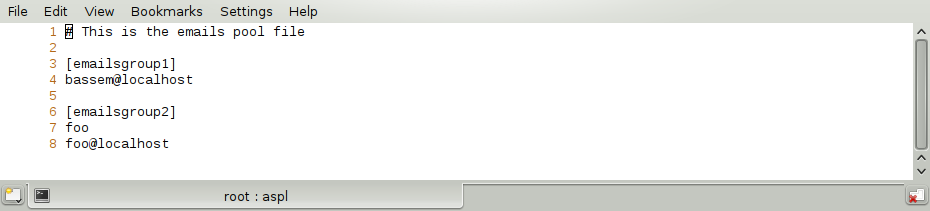
# asplcmd ~emailsfile
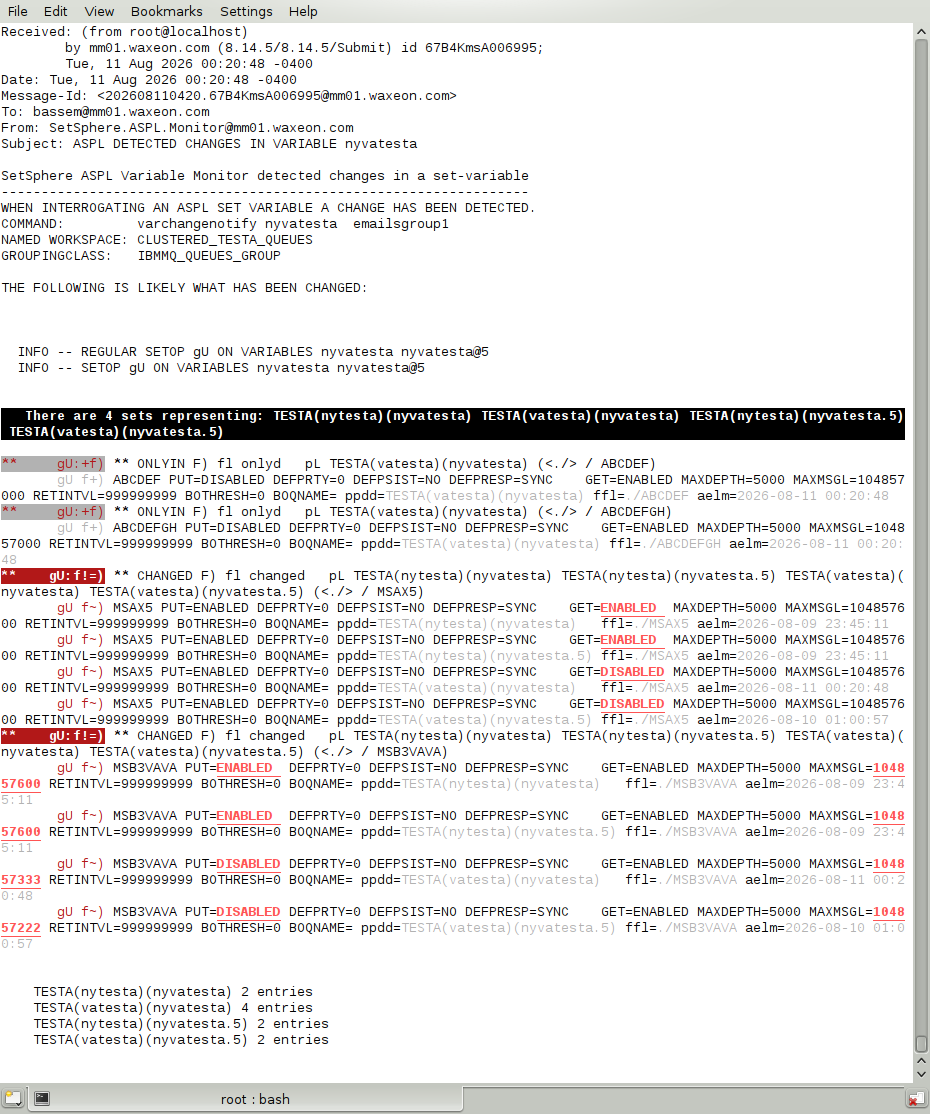
Because a configuration change was made to the MSB3VAVA queue on host vavamq, the system can detect the modification and send an email alert. Figure 3.2.10 illustrates these queue modifications for the queues in TESTA queue manager hosted on vavamq.
Figure 3.2.11 illustrates the output when executing the script against the nyvatesta group variable, which represents the queue manager cluster.
ASPL sends an email notification to the designated recipients to report queue modifications. Figure 3.2.12 illustrates an example alert sent to bassem@localhost detailing the configuration changes.