ASPLMQ User Guide v 1.00
© 2026 Bassem W. Jamaleddine
SetSphere's ASPL is a containment calculator that executes algebraic operations on set variables representing groups. Set variables are saved within distinct workspaces, where each variable name points to a GADg dataset object. This object is returned by a specialized global grouping function (GG-function) loaded in the GG-Container. Both the workspace and the grouping function must conform to the metadata specifications of the element grouping class managed by the egC-Container.
In the diagram below, the IBMMQ_QUEUES_GROUP class is defined in the egC-Container, and the ggqmgrqueues() function is loaded into the GG-Container. The IBMMQ_ACME_QUEUES workspace stores the set variables representing the queue groups for ACME Co.
  +----------------------------+
  | ASPL                       |
  |   egC-Container:           |                                            +----------+
  |    IBMMQ_QUEUES_GROUP      |                                            |  IBM MQ  |
  |   GG-Container:            + <---- ssh mqm@vavamq saveqmgr -m ACMECO <--+   QMGR   |
  |    ggqmgrqueues()          |                                            |  ACMECO  |
  |   Workspace Symbol Tables: |                                            +----------+
  |    IBMMQ_ACME_QUEUES       |
  +----------------------------+
ASPL provides various operators to perform group operations on datasets saved within its symbol tables. Operators can refresh the dataset represented by a set variable by interrogating it: the interpreter evaluates the variable and checks for structural modifications within its constituent group elements. Upon detecting a change, ASPL processes an incremental update: the variable increments its historical archive index, move the previous data into that archive slot, and updates its internal state with the latest configuration data. Consequently, ASPL variables function natively as differential group variables.
Before we begin, we will demonstrate that ASPL grouping containment operates on par with the way IBM MQ structures its objects on the UNIX filesystem.
The QMGRLAB queue manager is created on two hosts: nynymq and vavamq.
First, create and start the qmgr QMGRLAB. Configure the QMGRLAB instance locally on host nynymq.
(nynymq's qmgr:QMGRLAB) 18:23 mqm@nynymq: ~ # crtmqm QMGRLAB
(nynymq's qmgr:QMGRLAB) 18:23 mqm@nynymq: ~ # strmqm QMGRLAB
(nynymq's qmgr:QMGRLAB) 18:23 mqm@nynymq: ~ # runmqsc QMGRLAB < QMGRLAB.mqsc
(vavamq's qmgr:QMGRLAB) 18:23 mqm@vavamq: ~ # crtmqm QMGRLAB
(vavamq's qmgr:QMGRLAB) 18:23 mqm@vavamq: ~ # runmqsc QMGRLAB < QMGRLAB.mqsc
(vavamq's qmgr:QMGRLAB) 18:23 mqm@vavamq: ~ # strmqm QMGRLAB
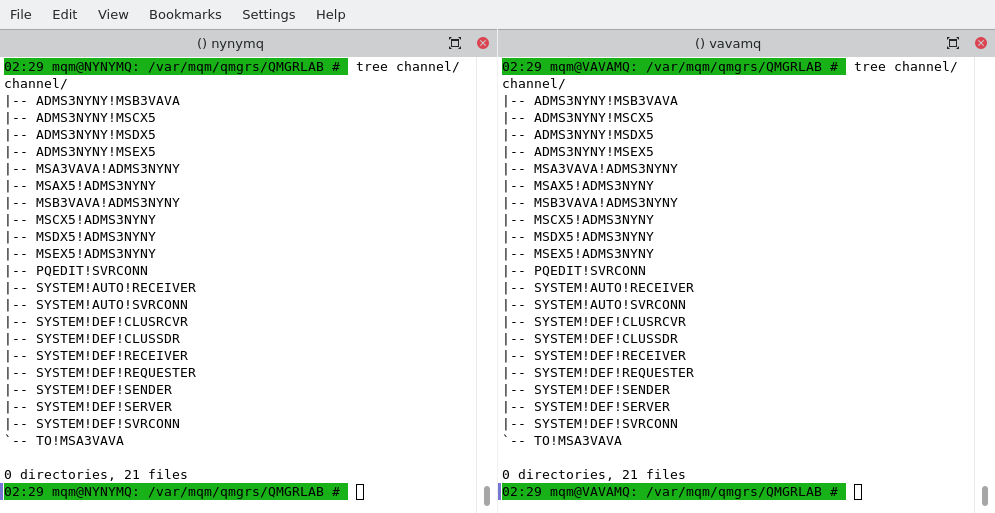
IBM MQ stores its structured data on the filesystem relative to the mqm user's home directory, defaulting to the /home/mqm/qmgrs/ path. Figure 1.1.1 shows a split vi editor tree representation of the channels created on the filesystem for the users mqm@nynymq and mqm@vavamq. Since nynymq and vavamq are separate hosts servicing IBM MQ, the mqm user on each server possesses an independent /home/mqm/qmgrs/ directory.
As shown in the figure above, the channels created on both hosts share identical naming structures, yet they reside within entirely distinct filesystem directories.
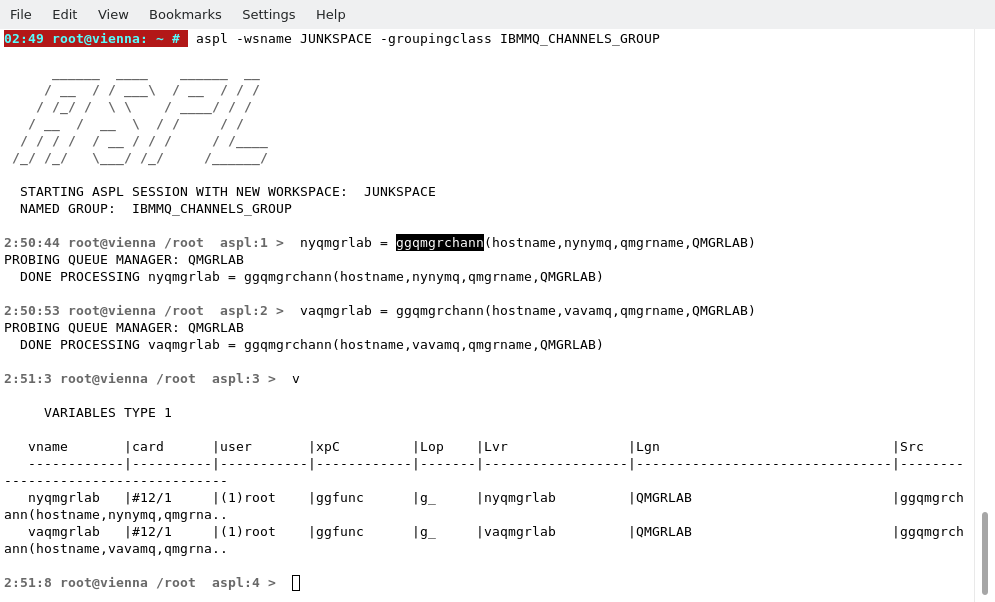
The ASPL interpreter is strated by loading an arbitrary namedspace JUNKSPACE whose element grouping class is IBMMQ_CHANNELS_GROUP. The nyqmgrlab and vaqmgrlab set variables are then assigned the group of channels defined inside the QMGRLAB queue manager on hosts nynymq and vavamq, respectively. Figure 1.1.2 illustrates the operations required to create both variables and details their internal representation within ASPL symbol table.
Comparing the QMGRLAB channels on both hosts is achieved by taking the union of the nyqmgrlab and vaqmgrlab set variables (see Figure 1.1.3).
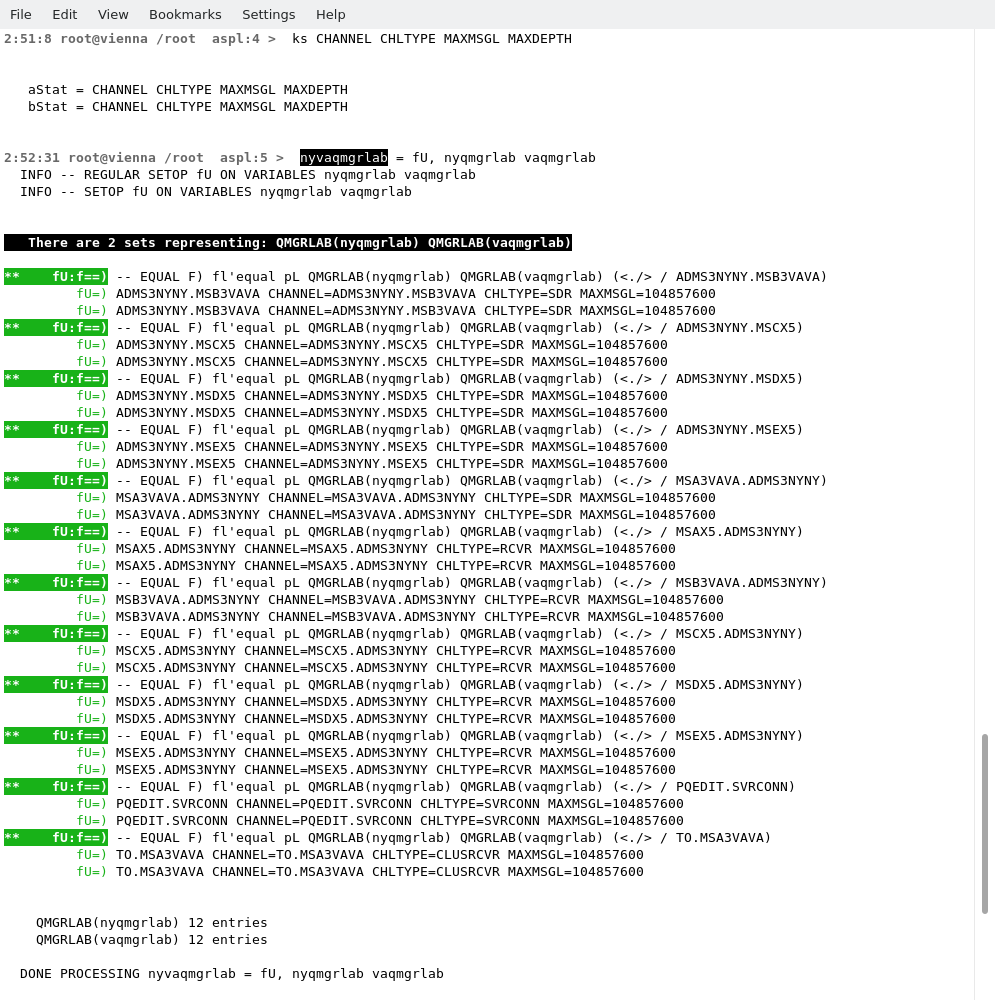
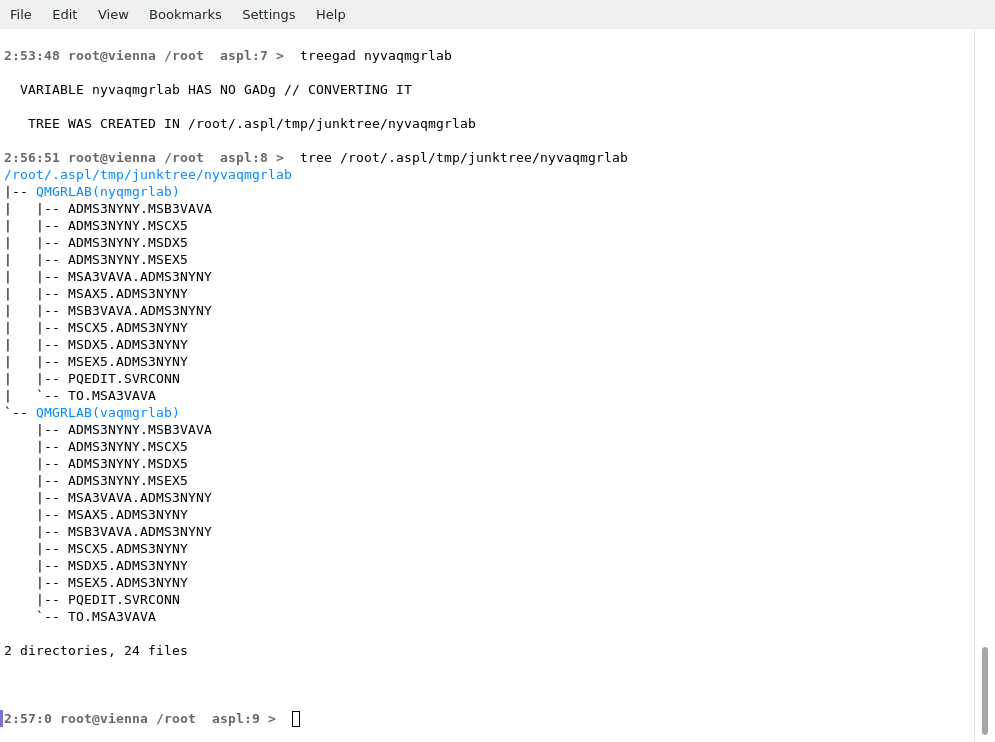
Figure 1.1.4 illustrates the registration of channels within the nyvaqmgrlab variable, which represents the union of the nyqmgrlab and vaqmgrlab set variables. This centralized layout contrasts directly with the distributed filesystem hierarchy depicted in Figure 1.1.1. Within this GADg tree view of the nyvaqmgrlab variable, both groups of channels are managed simultaneously inside a single ASPL session. By using ASPL group containment functions, configuration data from a distributed cloud environment is aggregated into a common workspace, enabling the use of group operators to perform direct data comparisons.
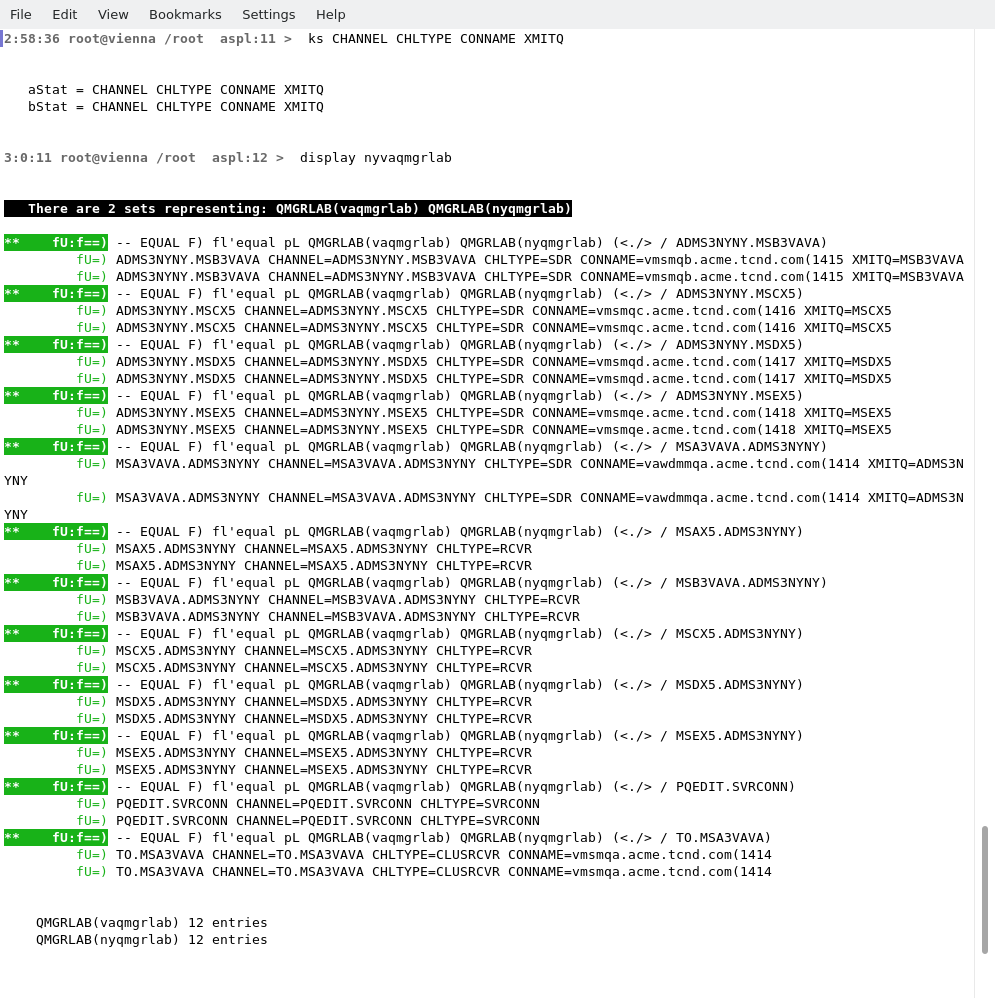
The ASPL interpreter provides extended capabilities for targeted analysis; for example, specific attributes can be isolated by configuring the ks-vector prior to displaying the set union, as illustrated in Figure 1.1.5.
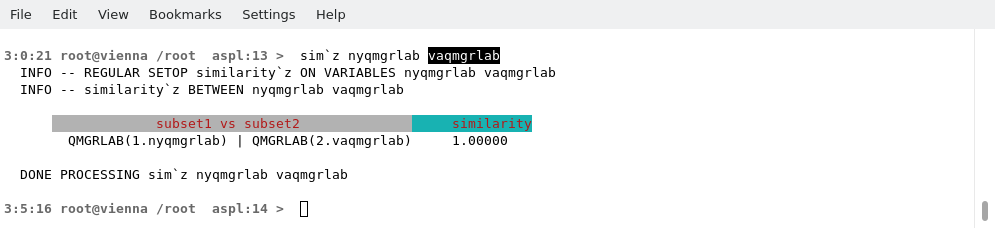
In a horizontal clustering topology where identical queue managers are replicated across multiple hosts, the similarity metric between the instances evaluates to 1.0, as illustrated in Figure 1.1.6.
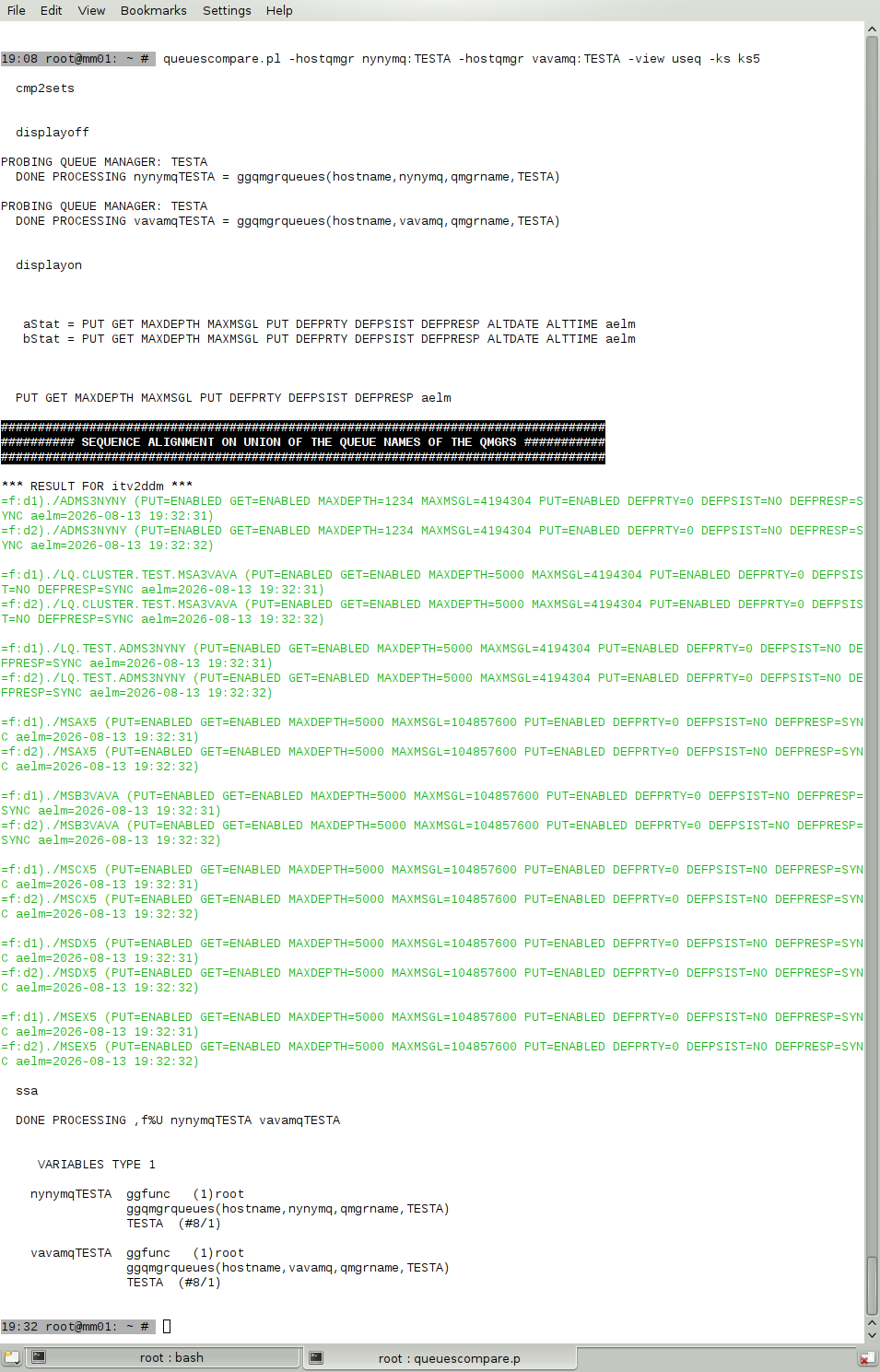
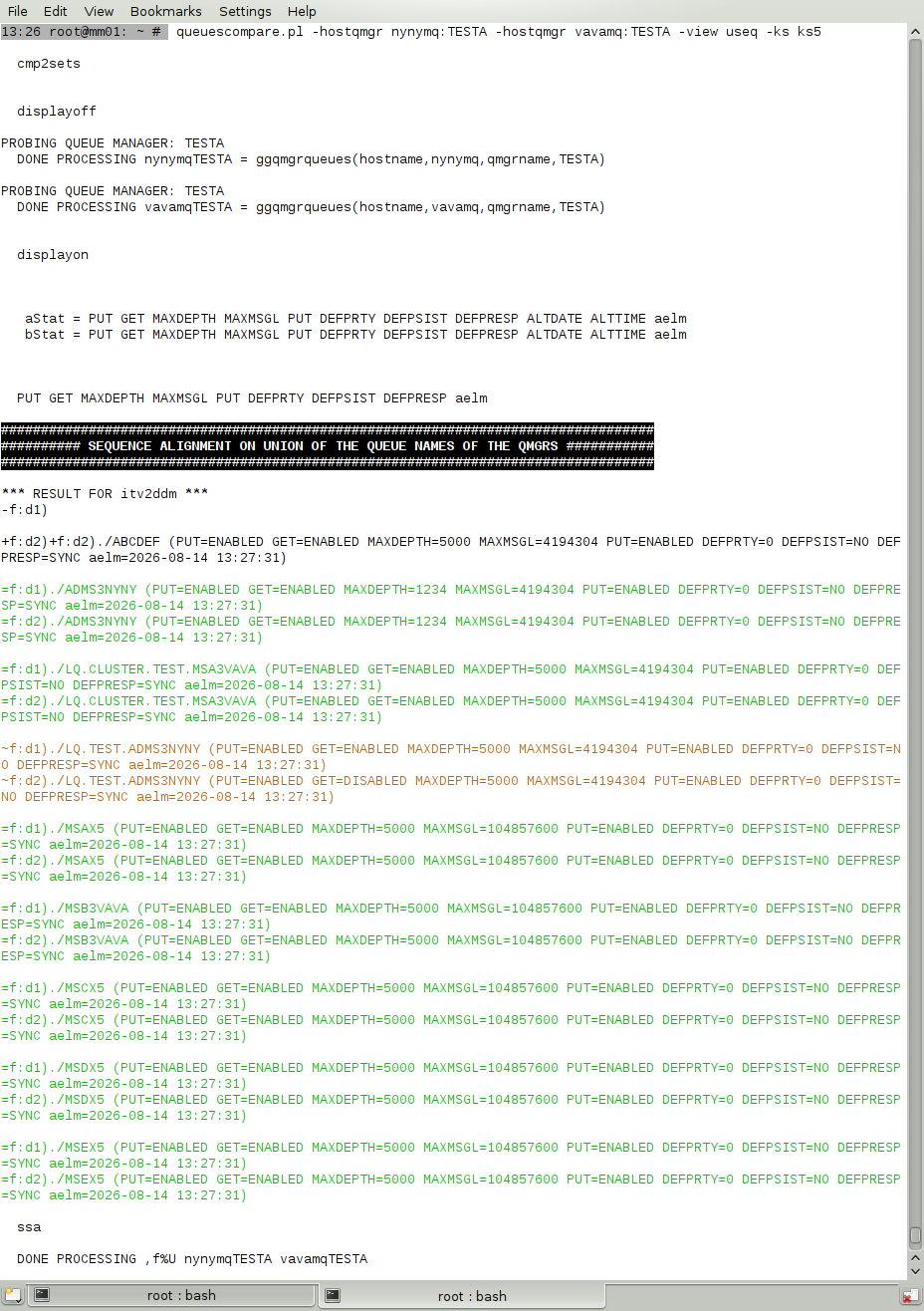
ASPL alignment operators expose the exact differences between queue managers. Figure 1.1.7 shows that queue manager TESTA is in perfect alignment for its queue configurations under the ks5 ks-vector.
# queuescompare.pl -hostqmgr nynymq:TESTA -hostqmgr vavamq:TESTA -view useq -ks ks5
After applying configuration changes to queue manager TESTA on host vavamq, the system alignment is verified once again. The commands are executed on vavamq by the mqm user: the first command creates the queue ABCDEF, and the second disables GET operations on the LQ.TEST.ADMS3NYNY queue.
(VAVAMQ's qmgr:TESTA) 19:32 mqm@VAVAMQ: ~ # echo "DEFINE QLOCAL(ABCDEF) REPLACE" | runmqsc TESTA
5724-H72 (C) Copyright IBM Corp. 1994, 2009.  ALL RIGHTS RESERVED.
Starting MQSC for queue manager TESTA.

     1 : DEFINE  QLOCAL(ABCDEF)  REPLACE
AMQ8006: WebSphere MQ queue created.
One MQSC command read.
No commands have a syntax error.
All valid MQSC commands were processed.
(VAVAMQ's qmgr:TESTA) 19:34 mqm@VAVAMQ: ~ # echo "ALTER QLOCAL(LQ.TEST.ADMS3NYNY) GET(DISABLED)" | runmqsc TESTA
5724-H72 (C) Copyright IBM Corp. 1994, 2009.  ALL RIGHTS RESERVED.
Starting MQSC for queue manager TESTA.

     1 : ALTER  QLOCAL(LQ.TEST.ADMS3NYNY) GET(DISABLED)
AMQ8008: WebSphere MQ queue changed.
One MQSC command read.
No commands have a syntax error.
All valid MQSC commands were processed.
Review the alignment (useq, union sequence) of queues in TESTA queue manager across both hosts by executing:
# queuescompare.pl -hostqmgr nynymq:TESTA -hostqmgr vavamq:TESTA -view useq -ks ks5
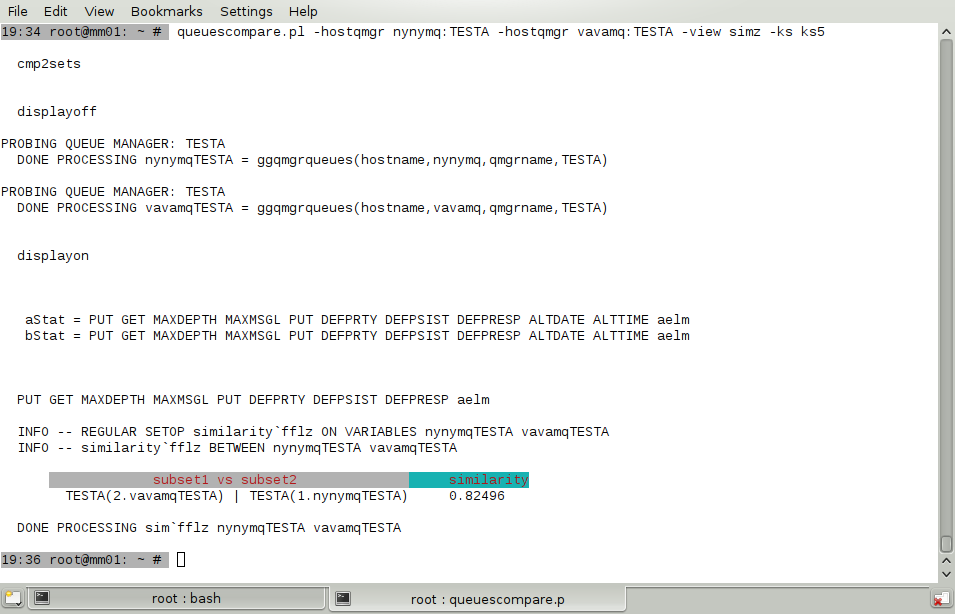
The similarity coefficient falls from 1.0 after the queue manager TESTA attributes are modified on host vavamq
# queuescompare.pl -hostqmgr nynymq:TESTA -hostqmgr vavamq:TESTA -view simz -ks ks5
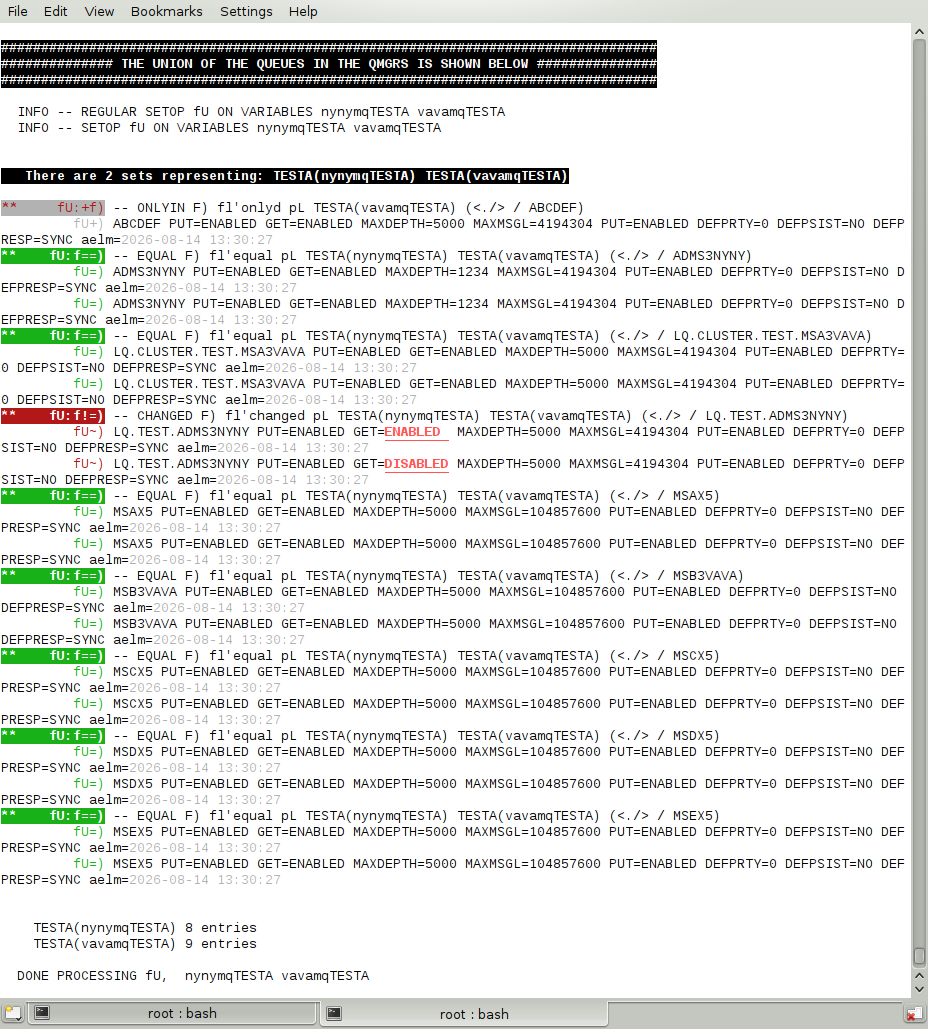
The ASPL group union operator exposes the differences between queue manager configurations. Figure 1.1.10 shows the element union filtered by the ks5 ks-vector. The ABCDEF queue appears only in the vavamqTESTA set variable, and the LQ.TEST.ADMS3NYNY GET attribute is highlighted in red because its state differs across the variables.
# queuescompare.pl -hostqmgr nynymq:TESTA -hostqmgr vavamq:TESTA -view funion -ks ks5
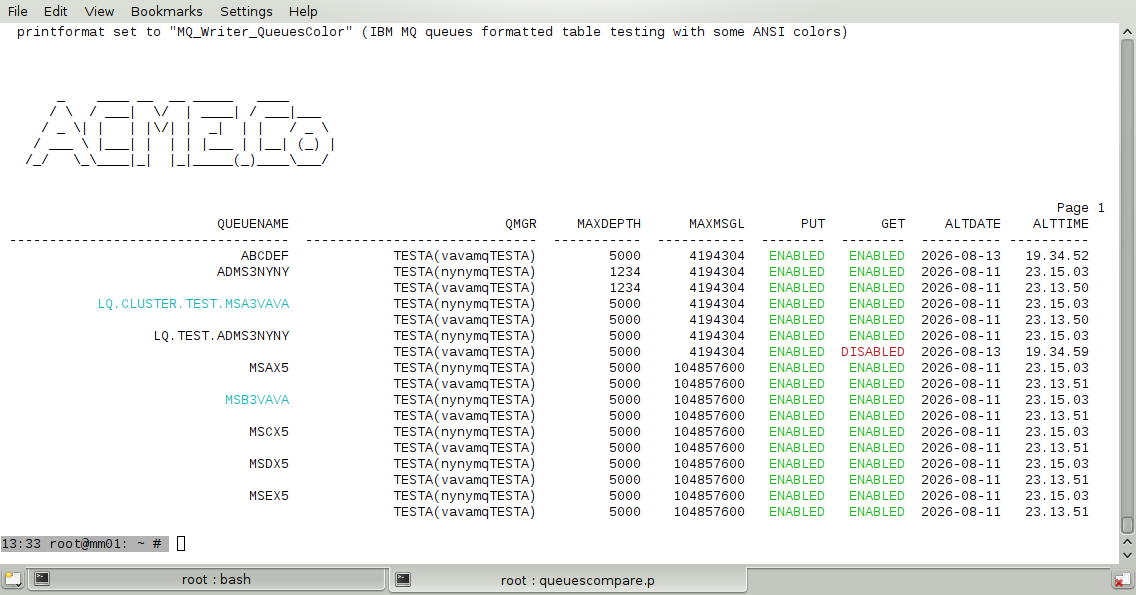
The -report option can be added to output a tabulated report showing the changes in the TESTA queue managers.
# queuescompare.pl -hostqmgr nynymq:TESTA -hostqmgr vavamq:TESTA -view funion -ks ks5 -report
To wrap up this introduction, the following paragraph illustrates how ASPL sends email notifications when a group configuration change is detected.
Monitoring a group represented by an ASPL set variable is simple. An an example to demonstrate that ASPL set variables are self monitoring variables, and a group represented by an ASPL set variable can be simply monitored by toggling the variable's monitoring bits.
Tracking a group represented by an ASPL set variable is simple. ASPL set variables are self-monitoring variables, meaning a group can be tracked by toggling the variable's monitoring bits.
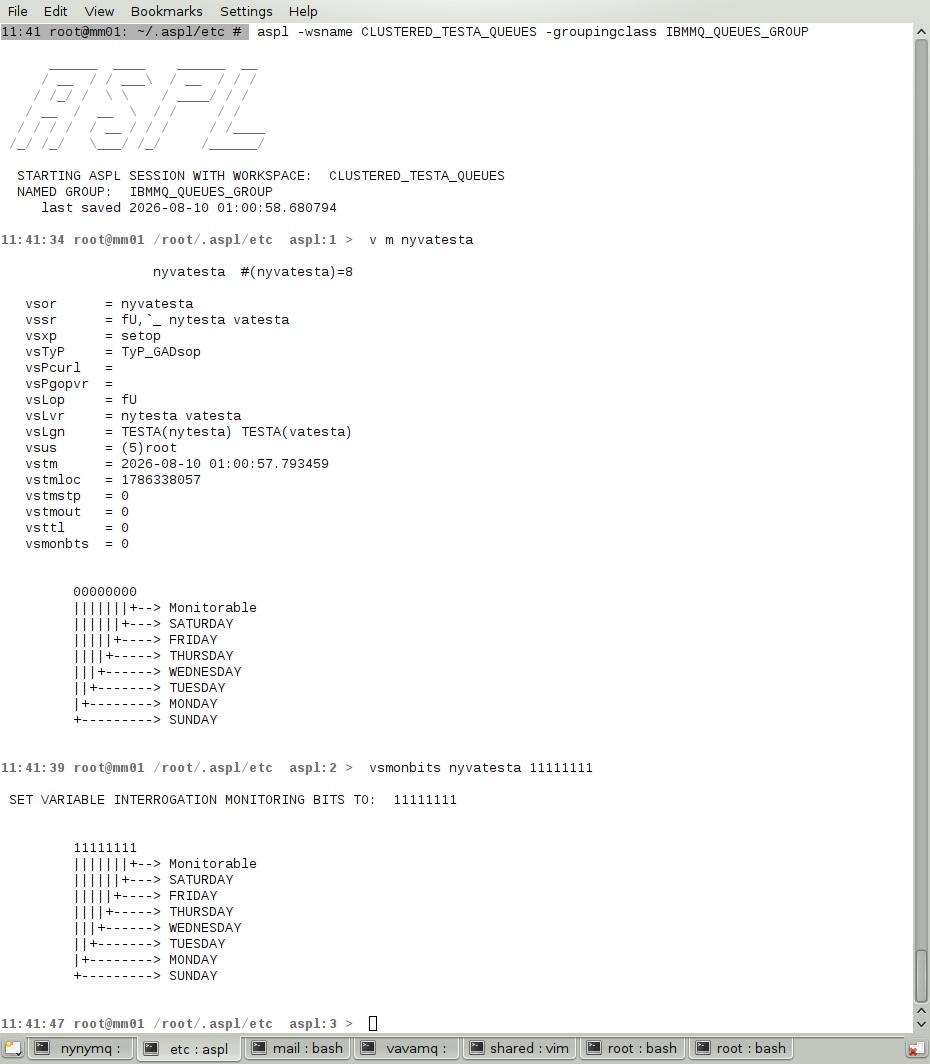
Each ASPL variable contains eight bits that are toggled to enable tracking for specific days of the week. Figure 1.1.13 shows the toggled monitoring bits for the nyvatesta set variable in the namedspace CLUSTERED_TESTA_QUEUES.
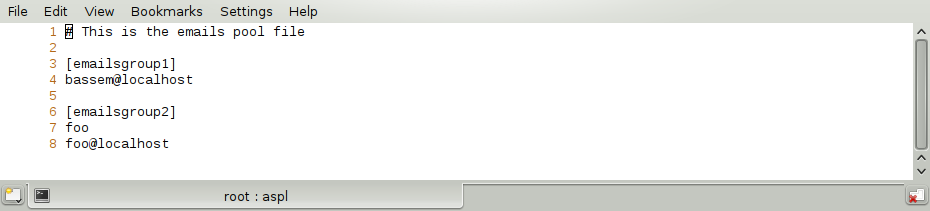
To trigger automated email notifications for the nyvatesta monitoring variable, execute the ASPL varchangenotify command at the interpreter prompt followed by the variable name and target notification group: varchangenotify nyvatesta emailgroup1. The emailgroup1 tag identifies the distribution list in the ASPL emailsfile. Edit this configuration file by running the following command at the shell prompt:
# asplcmd ~emailsfile
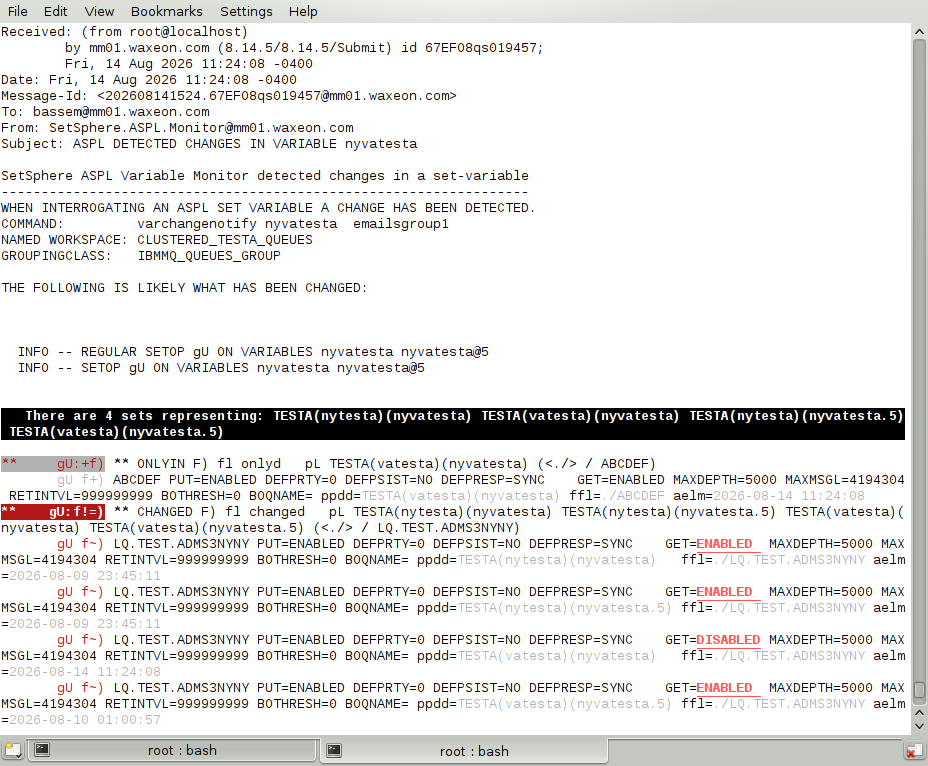
An email notification is sent to recipients when a monitoring variable detects a change in the group. Figure 1.1.14 displays the email sent due to the alterations made within queue manager TESTA.
ASPL allows groups represented by set variables to be compared with one another. Additionally, a set variable can be evaluated against its own historical states over time because ASPL set variables operate as differential group variables. Refer to the ASPL User Guide for further details on these variable structures.
This text functions as a case study for using ASPL and Perl to manage middleware configurations in IBM MQ environments. The following sections explain how to parse IBM MQ objects using Perl to identify queues and channels, alongside short scripts for filtering and printing tabulated reports.