ASPL User Manual v 1.00
© 2025 SetSphere.com
The ASPL interpreter is a general purpose set-calcultor that has many features to do operations on datasets. It is an interactive application where the user interacts with his aggregated datasets at the ASPL prompt, and the application provides many operators to do sophisticated algebraic set operations and display their results in real time. The interpreter also provides a scripting language that is simple but powerful enough to supplement your system with analytical commands. In this chapter, we describe only those features of ASPL that are sufficient for interacting with the interpreter and for writing reasonaly interesting scripts.
■ ASPL Statements
Statements are typed one to a line. The components of a statement must be seperated by at least one blank. Comments may be added to a statement by typing two successive semicolons ;; anywhere to the right and following it with the comment.
The following code shows statements and comments in ASPL.
;; this line is ignored
f& a1 a2   ;; display the intersection of elements between a1 and a2
ans        ;; print the answer memory stack
dU a1 a2   ;;  display the unions of subgroups between a1 and a2
fD a1 a2   ;;  display the symmetric difference between a1 and a2
;; this is a comment and so everything above following the ;;
gU a1 a2; v; ans; pop a3  ;; here are four statements separated by ;
Any line starting with two successive semicolons ;; is considered a comment and is ignored by the interpreter.
aspl> ;; do nothing this is a comment
(this is a comment)
aspl> gU a1 a2; wid; v; ans ;; ignored as a comment
(display union of a1 a2, print workspace, print symbol table and answer stack)
ASPL statements are of three kinds: set operations, aspl directives, and miscellanous UNIX like commands.
- Set operations are expressions that starts with a set operator symbolic mnemonic. These set operations can be further classified by four kinds.
- Directive commands that allow the user to control the state of ASPL internal components.
- Miscellanous commands that include: UNIX like commands to allow the user to navigate through the system seemlessly, as ASPL is a containment application that uses the UNIX filesystem extensively to store its data.
UNIX like commands to make ASPL easy to use and integrate with the UNIX shell where it is being started.
Containment commands to control or to communicate with ASPL containers. The containment commands are used to ping, to add to, or to delete from ASPL containment grouping class.
- Set operators, called setops, these operators perform basic set operations on datasets, their results may be assigned to identifiers called set variables.
- Set comparison operators (equal subset superset disjoint) are used to compare set variables.
- Sequence alignment operators, called seqops, these operators align and display datasets.
- Similarity operators that calculate and display similarity between datasets. Their results may be assigned to identifiers called COS variables.
The set operations are carried out through symbolic or keyword operators.
Command                      Description
-----------    ---------------------------------------------------------------
egCwhoami      ping the element grouping class of the currently loaded session
attributes     print the attributes of the grouping class
v              print the symbol table
ans            print the answer stack
display        display a set variable
usage          print the memory usage by the ASPL interpreter
~tmp           change directory to ASPL tmp dirctory
cd             change directory
ll             list files
tree           print the tree structure of the directory
treed          print the directory tree structure of a directory
wls            list workspaces in the workspace folder
wid            print currently loaded workspace and ASPL uptime
h              print history of commands in current session
hs             print history of commands for the currently loaded workspace
description    print the description of the currently loaded workspace
describe       edit the description of the currently loaded workspace
whichma        a UNIX which like command with many enhancements and colorful output
Other commands, that start with the tilde, are called tilde-expansion, like ~tmp and ~home that change directory to ASPL temporary directory and ASPL home directory respectively; ll and wls commands that list the files in the current directory and list the workspace repository respectively, etc.
The user can type help at the ASPL prompt to get a list of the basic commands. The help utility can also display information by category. The first time you start your ASPL interpreter you will be prompted to enter a command.
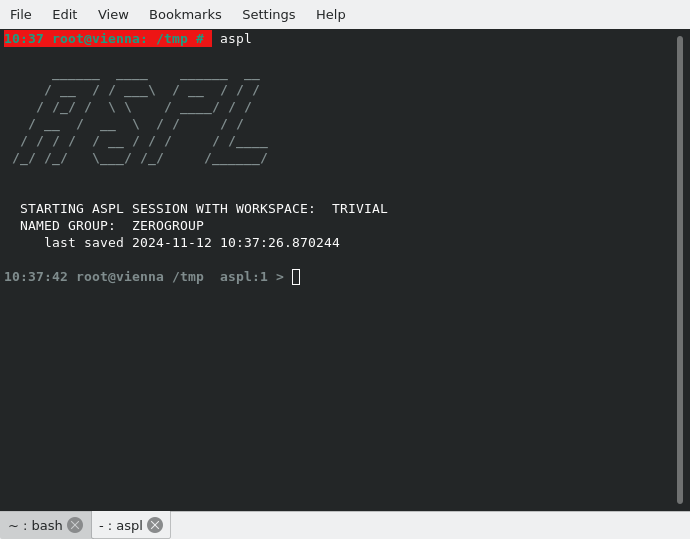
By default the ASPL interpreter starts by loading the TRIVIAL workspace which is the basic workspace. Howeber you can load any other workspace by specifying the name of the workspace following the aspl command. There is a short way to run an ASPL command (at the shell prompt) by preceding the command with asplcmd, for instance to list the workspaces you can type at the shell prompt asplcmd wls or asplcmd wlls, and to print the description of the sample workspace WS1 you can type asplcmd "load WS1; description".
■ Set Operations at the ASPL Prompt
ASPL is a symbolic language, its operators are short mnemomics that represent set operations to be performed on the operands. The following shows some set operations performed in ASPL when loading the sample workspace WS1.
For example fU,f&,and f\, have the following operations on the operands a1 and a2.
Setop Set-instruction                Operation
---------------------           --------------------
fU a1 a2                        UNION a1 a2
f& a1 a2                        INTERSECT a1 a2
f\ a1 a2                        DIFFERENCE a1 a2
Some other ASPL operations are listed and explained below.
Setop Set-instruction             Operation
---------------------        --------------------------------------------------
a12i = f& a1 a2              a12   <- INTERSECT a1 a2
A12i = f*& a1 a2             A12i  <- SHALLOWINTERSECT a1 a2
A12c = c& a1 a2              A12c  <- CHECKSUMINTERSECT a1 a2
A12uc = cU a1 a2             A12c  <- CHECKSUMINTERSECT a1 a2
A12p = fP a1 a2              A12p  <- PARTITION a1 a2
A12pc = cP a1 a2             A12pc <- PARTITIONCHECKSUM a1 a2
gU a1 a2                     group union of a1 and a2
pop au12                     au12 assigned to the object on top of stack
ggdir(dir,/tmp/aa1)          group representing the directory /tmp/aa1
ASPL is typeless that is there is no data type desclaration for any identifier. However, since ASPL is typeless, it uses a mechanism to manage its internal data. The interpreter uses symbol tables and memory stacks when performing its operations, and the user is provided with commands to view the stored symbols (identifiers) and any anonymous group stored in them.
■ The Answer Stack
Every time you issue a set operation on the ASPL prompt, the interpreter pushes its result on the answer stack. To display the answer stack, enter the command ans, and to print the symbol table, enter the command v.
# aspl -wsname WS1 -groupingclass POSIX
aspl> v
print symbol table
aspl> ans
print the answer stack
aspl> f& a1 a2
display the intersection between a1 and a2
aspl> ans
print the answer stack
aspl> fU a1 a2
display the union between a1 and a2
aspl> ans
print the answer stack
aspl> f\
display the difference between objects on top of stack
aspl> ans
print the answer stack
aspl> quit
leave ASPL without saving the workspace
■ ASPL Variables
A variable is a container that you create. You can create a variable any time you need one, and there is no limit (other than available memory) to the number of variables you can create or to their size. You create a variable by putting a value into it. ASPL variables are all global variables. There is no variable declaration, and for the user all ASPL variables can be viewed as typeless variable. By default all variables reside in memory and are never stored in disk until they are committed and stored in their named workspace. While variables are stored in memory, they can also be committed and saved in a named worskspace.
ASPL has a flag to make all variable persisted immediately to their workspace. When the variable persistence flag is turned on then the variables end up being stored on disk, and if two or more ASPL instances are started with the same named workspace then all variables are being shared globally by all ASPL instances (as long as the workspace directory is available to all instances).
variables persisted to all users using a common workspace in real time. You
need to enable the flag "persist data changes" and the flag "synchronize workspace container" for all users sharing workspaces.
Since ASPL variables are typeless and the result of a set operation may return an object of different structure (or shape), then ASPL will determine the way to store these variables. The user does not need to declare any variable type, but has to pay attention to the type of operation being performed. Just consider the two operations a12 = fU a1 a2 and simi12 = sim a1 a2, the first operation creates the variable a12 in the setop symbol table, while the second operation creates the variable simi12 in the COS symbol table. The symbol tables are discussed below in their own section.
You cannot delete variables, but you can reassign the same variable as many times as you want. You can clear all symbol tables in a workspace by typing the CLEAR command at the ASPL prompt. You need to issue the save command to commit the changes in the cleared symbol tables.
To copy the sample workspace WS1 to WS1JUNK
# asplcmd "load WS1;save WS1JUNK"
The following operations will clear the symbol tables in WS1JUNK
# aspl WS1JUNK
aspl> v
aspl> ans
aspl> clear
clear the symbol tables
aspl> clearans
clear the answer stack
aspl> v
aspl> save
aspl> quit
# asplcmd "wrm WS1JUNK"
■ Shapes of Variables
To put it simply how ASPL variables represent groups, we shall talk about the shapes of these variables, and define the different shaped variables contents as follow:
- The Gs(S) denotes the contents of dataset S whose shape is H_H_H, that is an object of hash-of-hash-of-hash
- The Ga(S) denotes the contents of augmented-dataset S (also called binned-dataset S) whose shape is H_H_AH, that is an object of hash-of-hash-of-array-of-hashes
- The Gp(S) denotes the contents of parted-dataset S whose shape is either H_H_H_H or H_H_H_AH
The shapes H_H_H and H_H_AH refers to objects structured as hash-of-hash-of-hash and hash-of-hash-of-arrayed-hashes respectively. Hence it becomes apparent that a shaped variable H_H_AH can hold more information than another whose shape is H_H_H. That is true when one compares the tail of both shapes (H_H_H vs. H_H_AH), one ending in '_AH' (as array of hashes) and the other ending in '_H' (as hash).
In general, an array of hashes is a bin of objects, while a hash is just an object. One can add more objects to a bin (hence hold more information in the bin) which is not possible with a hash as the object attributes may overlap (causing the loss of information).
Let's rewrite the operations written in the previous section by using the pseudo representation Gs(), Ga(), and Gp(). The following shows these operations:
Setop Set-instruction                Operation                                    Resulting Shape
---------------------    --------------------------------------------------       ---------------
a12i = f& a1 a2          Gs(a12)   <- INTERSECT Gs(a1) Gs(a2)                      H_H_H
A12i = f*& a1 a2         Ga(A12i)  <- SHALLOWINTERSECT Gs(a1) Gs(a2)               H_H_AH
A12c = c& a1 a2          Ga(A12c)  <- CHECKSUMINTERSECT Gs(a1) Gs(a2)              H_H_AH
A12uc = cU a1 a2         Ga(A12c)  <- CHECKSUMINTERSECT Gs(a1) Gs(a2)              H_H_AH
A12p = fP a1 a2          Gp(A12p)  <- PARTITION Gs(a1) Gs(a2)                      H_H_H_H
A12pc = cP a1 a2         Gp(A12pc) <- PARTITIONCHECKSUM Gs(a1) Gs(a2)              H_H_H_AH
gU a1 a2                 anonymous group saved on the top of answer stack          H_H_H
pop au12                 Gs(au12)  <- anonymous group popped and assigned to au12  H_H_H
ggdir(dir,/tmp/aa1)      anonymous group saved on the top of answer stack          H_H_H
ASPL variables have shapes. In the operations above, the last column shows the shape of the variable. The last row in the table does not refer to any variable identifier but calls a global grouping function called ggdir() generating an anonymous group to be saved on the top of the answer stack. The third row from the last, the command gU a1 a2 does not create any identifier but create an anonymous group representing the union of the groups in a1 and a2, the resulting anonymous group is saved on the top of the answer stack.
To print the shape of a variable, you can type shape followed by the variable name.
Setop Set-instruction    ASPL Command shape          Printed Shape
---------------------   ------------------------     --------------------
a12i = f& a1 a2         shape a12i                   H_H_H
A12i = f*& a1 a2        shape A12i                   H_H_AH
A12c = c& a1 a2         shape A12c                   H_H_AH
A12uc = cU a1 a2        shape A12uc                  H_H_AH
A12p = fP a1 a2         shape A12p                   H_H_H_H
A12pc = cP a1 a2        shape A12pc                  H_H_H_AH
gU a1 a2                shape  (anon group on stack) H_H_H
pop au12                shape au12                   H_H_H
ggdir(dir,/tmp/aa1)     shape (anon group on stack)  H_H_H
The first operation a12i = f& a1 a2 instructs ASPL to do the intersection operation between the two set variables following it, then assign the result to a12i whose shape is H_H_H. In the absence of operands, a12i = f&, ASPL will look into the answer stack to read the top and one below the top to do the operation. For example, the following operations have the same effect as this a12i = f& a1 a2
aspl> push a2 a1
push a2 a1 on top of the stack
aspl> a12i = f&
set intersection now on top and one below top of stack
aspl> push a1 a2
push a1 a2 on top of stack
aspl> a12i = f&
set intersection now on top and one below top of stack
■ ASPL Symbol Tables
ASPL stores its identifiers (such as set variables) and anonymous objects (resulting from set operations or grouping function operations) in symbol tables and memory stacks. The interpreter has three symbol tables and three answer stacks.
Let's repeat the previous operations, but this time we will enable the tattler with the command tattler 1 to toggle it.
When the tattler is toggled, a tattler-line is displayed following each set operation. The line shows where a dataset object is read from and where the result of the operation is stored. An example of the tattler-line is summarized in the following figure.
Let's rewrite the commands issued in the previous section, but this time we show the tattler-line following each operation.
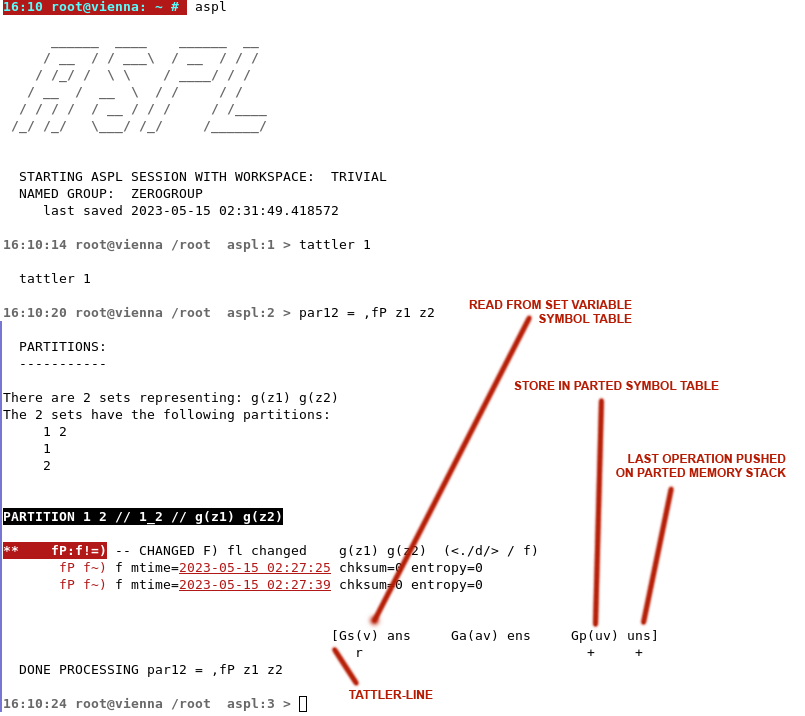
tattler-line                                      operation
----------------------------------------          ---------------
[Gs(v) ans     Ga(av) ens     Gp(uv) uns]         a12i = f& a1 a2
   r+   +
[Gs(v) ans     Ga(av) ens     Gp(uv) uns]         A12i = f*& a1 a2
   r             +     +
[Gs(v) ans     Ga(av) ens     Gp(uv) uns]         A12c = c& a1 a2
   r             +     +
[Gs(v) ans     Ga(av) ens     Gp(uv) uns]         A12uc = cU a1 a2
   r             +     +
[Gs(v) ans     Ga(av) ens     Gp(uv) uns]         A12p = fP a1 a2
   r                            +     +
[Gs(v) ans     Ga(av) ens     Gp(uv) uns]         A12pc = cP a1 a2
   r                            +     +
[Gs(v) ans     Ga(av) ens     Gp(uv) uns]         A12pc = cP a1 a2
   r                            +     +
[Gs(v) ans     Ga(av) ens     Gp(uv) uns]         pop au12
   +    -
The r stands for reading.
The + stands for adding.
The - stands for deleting as is the case when we pop from the answer stack.
The * stands for archiving an identifier then storing its updated value, following ? operator.
  That is when ASPL detects that the identifier is already in the storage, then ASPL
  will save its previous data to the identifier name suffixed with @IIN where IIN is
  an incremental number.
ARC_VARIABLES=1
You can disable the archiving by setting it to 0, but then historical data of an identifier is not kept
ARC_VARIABLES=0
Any set variable is identified by a symbolic name labeling a complete object.
For example, when assigning y1 = x1 or copying copy x1 y1
cause the dataset in x1 to be completely copied to a new storage that
is identified by x1.
Taking the group union x12 = gU x1 y1 creates a new group, identified
by x12, representing the union of x1 and y1 without pointing to any structural
data of the operands identified by x1 and y1.
ASPL reads the identifier from a specific symbol table or memory stack, performs the operation, then depending on the operator, ASPL stores the result in the specific symbol table. This is needed because a resulting object has a shape, and ASPL is typeless but is not agnostic in storing and managing its data objects. When ASPL reads or stores an identifier, it determines which symbol table or memory stack to use. This depends on the type of operation to be performed.
There are three symbol tables in ASPL, these can be shown in the tattler-line.
- The first symbol table stores objects whose shapes are H_H_H.
- The second symbol table stores objects with H_H_AH shapes.
- The third symbol table stores any other objects with different shapes, for example a partitionned set variable is shaped as H_H_H_AH.
ASPL Operations Guide is a valuable guide that describes the syntax of each set operator.
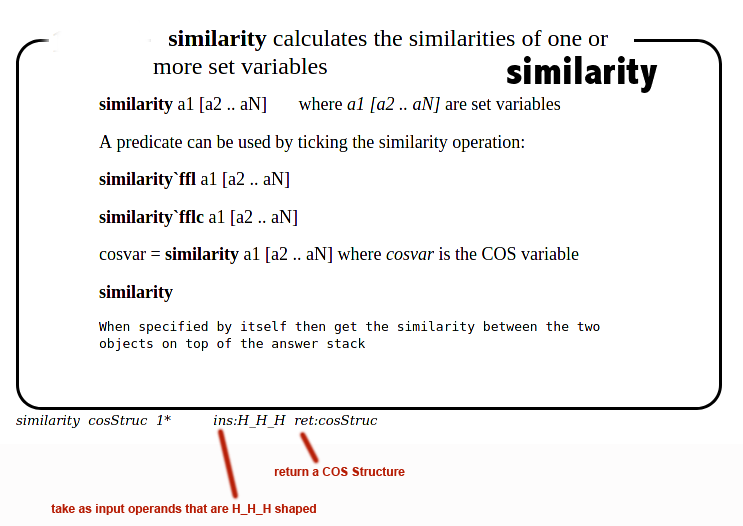
Let's look at the f& operator shown in figure 2.1.3. The operator syntax is described in its description box. At the bottom of the box, there are two entries showing ins: and ous: (ins is followed by the shape of input operands or anonymous group the operator expect, and ous is followed by the shape of its output).
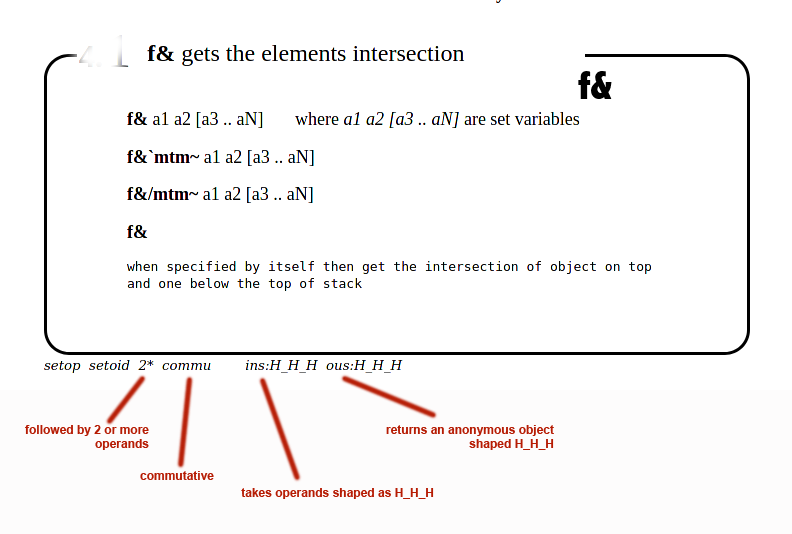
Figure 2.1.4 shows the merge operator in its syntax box.
At the bottom of the box, the ins: and ous: are followed by the shape of the objects being fetched and generated respectively.
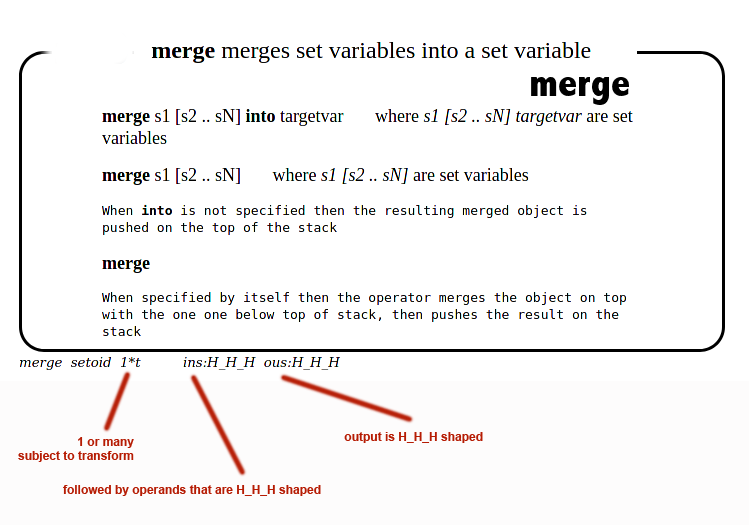
The ins and ous, shown at the bottom of the syntax box, describe
the shape of the input expected, and the shape of the object generated by the set operator.
A symbolic operator may not generate a shaped output, but returns something else, in which case a ret: followed
by the type of return value is shown at the bottom of the box.
Figure 2.1.5 shows the syntax box of the similarity operator that takes H_H_H shaped operands but returns a COS structure.
■ The COS Symbol Table
Similarity is a useful operator to calculate the similarity between datasets based on a cosine calculation between the data. ASPL has a COS symbol table to store similarity identifiers. To create a similarity identifier simply specify a variable name and assign it to the similarity operation, and to print the COS symbol table simply type cos. The following show how to print the COS symbol table.
# aspl -wsname RANDONEBIT -groupingclass BITGROUP
aspl> sim v1 v2 v3
display the similarity between v1 v2 and v3
aspl> cos
display the COS symbol table
aspl> simi123 = sim v1 v2 v3
assign the similarity calculatiion to COS variable simi123
aspl> cos d simi123
display the COS variable simi123 structured descriptor
aspl> cos
display the COS symbol table
aspl> cos sorted
display the COS symbol table include the archived symbols
aspl> ?c simi123
interrogate the similarity variable simi123
aspl> cos sorted
display the COS symbol table include the archived symbols
aspl> cosdepend simi123
display the dependencies for COS variables simi123
aspl> ??c simi123
really interrogate the similarity variable simi123 and its dependencies
aspl> cos sorted
display the COS symbol table include the archived symbols
aspl> @c simi123
display the archived COS variables for simi123
aspl> cos d simi123
display the COS variable simi123 structured descriptor
aspl> quit
leave ASPL without saving the workspace RANDONEBIT
you can print it by typing any of the following:
COS cos C c
To print everything in the COS symbol table:
cos sorted or c sorted
To print the descriptor of a COS variable:
cos d or c d followed by the variable name.
To print the dependencies of a COS variable:
cosdepend followed by the variable name.
To print the archived identifiers of a COS variable:
@c followed by the variable name.
To interrogate a COS variable:
?c followed by the variable name.
To interrogate a COS variable along all its dependencies:
??c followed by the variable name.
■ Ticking Set Operators With Predicates
Type attributes at the ASPL prompt and the interpreter displays a table showing the list of attributes defined for each element of the groups represented by the set variables. In particular, the following three attributes: mtime, chksum, and entropy, are standardized in the definition of any group's subgroups or their elements.
For any group, ASPL standardizes the attributes (shown in the table below) to be present for all elements and for all subgroups. For each one of the three attributes (mtime chksum entropy), ASPL provides conditional predicates that can affect the set operation, and the set operator can be ticked with one of many syntactic variation based on that predicate.
attribute       meaning                       tickable syntactic variation
----------  -------------------         -------------------------------------------
mtime       modification time           mtm=  mtm~  mtm~~  mtm<  mtm<=  mtm>  mtm>=
chksum      checksum                    c=  c~  c~~
entropy     entropy                     h=  h~  h~~
aelm        auxiliary attribute
ppdd        grp1 name of element
ffl         folded subgroup and element
dosi        doc similarity measure
For example, f&
`mtm~ a1 a2 is read as "get the elements intersection between a1 and a2 such that the mtimes (make times or modification
times) are different", and we refer to this operation as "ticking the set operator f& with mtm~".
One may be accustomed to school algebra notation where this can be written as f&/mtm~, and this form can also be written
in ASPL; this is called quotient set and is written with the stroke symbol / replacing the tick as f&/mtm~.
This is said "we stroke the f& operation with mtm~" so to refer to the elements intersection such that the mtimes are different.
Not all set operators are tickable, and some can be ticked with a predicate but may not have an equivalent stroke notation.
Ticking with a predicate allows us to select the elements or subgroups such that one of the standardized-attributes is satisfied. The standardized-attributes are shown in the following table.
  ticked   | suchthat
 ==========|==============================================================|
  `_       |                                                              |
  `c=      | such that they have the same checksum                        |
  `c~      | such that they have different checksums                      |
  `c~~     | such that they have all over different checksums             |
  `h=      | such that they have the same entropy                         |
  `h~      | such that they have different entropies                      |
  `h~~     | such that they have all over different entropies             |
  `mtm=    | such that they have the same make time                       |
  `mtm~    | such that they have different make times                     |
  `mtm~~   | such that they have all over different make times            |
  `mtm<    | such that they have a prior make time                        |
  `mtm<=   | such that they have prior or same make time                  |
  `mtm>    | such that they  have more recent make time                   |
  `mtm>=   | such that they have more recent or same make time            |
  `ks=     | such that they have the same ksum                            |
  `ks~     | such that they have different ksums                          |
  `ks~~    | such that they have all over different ksums                 |
What if we want to have multiple attributes to be combined in a conditional predicate, and even include other attributes known to the group (but not included in the standardized-attributes).
It is possible to combine several attributes using the ks-vector, then use it as a conditional predicate by ticking it with one of its variation:
`ks= `ks~ `ks~~.
At the ASPL prompt, type help ks or ks to see what ks is being set to.
You can set ks-vector by typing ks then following it by a series of attributes, then you tick the set operator with
the ks-vector as a predicate to have the operation gone with "such that the attributes in ks satisfy the condition".
The following are the syntactic variation of the ks-vector:
ks= ks~ ks~~
For example to find the elements intersection between a1 and a2 where mtime or entropy are different:
aspl> ks mtime entropy ppdd ffl aelm
set the ks to mtime entropy
aspl> f&`ks~ a1 a2
This will read as "find the element intersection such that the mtime or the entropy are different across the elements".
The attributes: ppdd and ffl are ignored by all ASPL set operations, but they can be included in the ks-vector to print additional information when displaying the results. The user can see the group labels, and the subgroups and their element branches of each entry being displayed.
The aelm attribute is an auxiliary element attribute that is also ignored ignored by ASPL set operators, usually it is provided to stuff it with any string we wish to display without affecting the set operations.
"do the set operation on the dataset such that."
You can list the set operators along their possible tick predicates by
entering at the shell prompt one of the following command
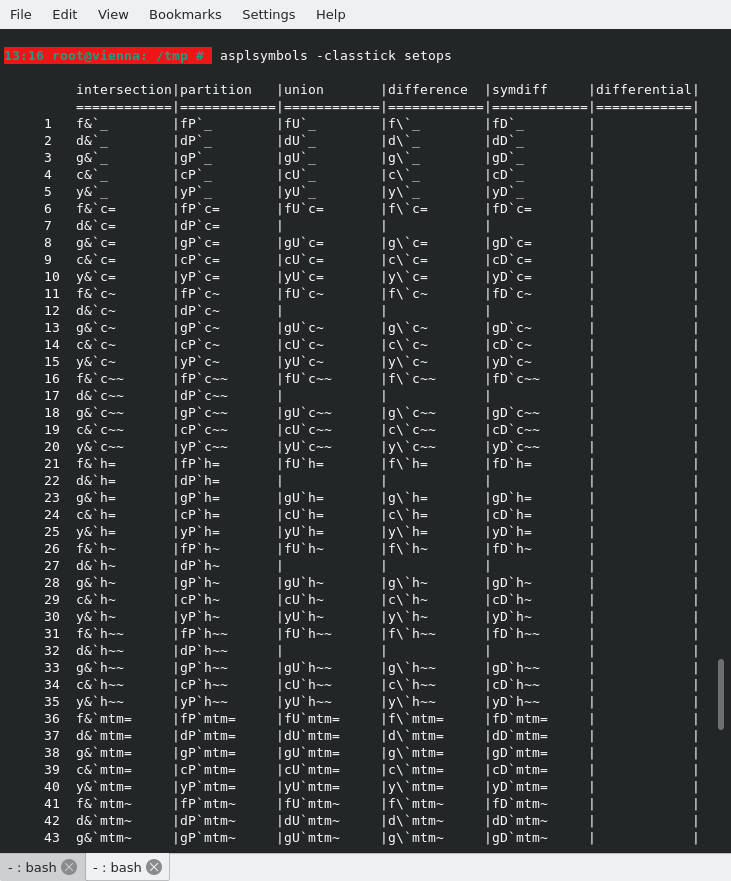
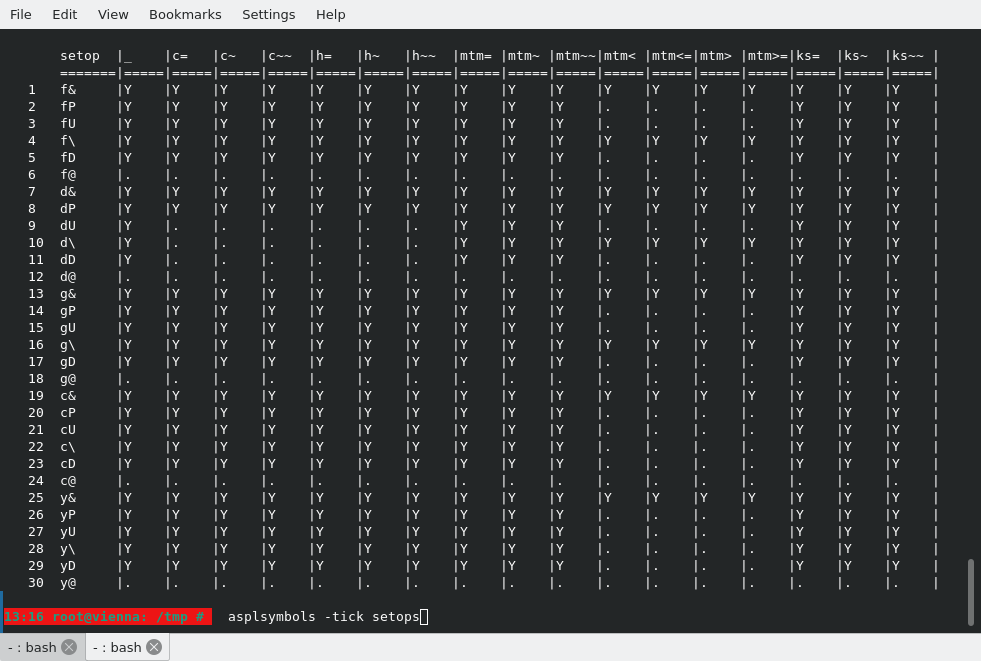
# asplsymbols -tickphrase setops
# asplsymbols -tick setops
You can also display the meta data of a set operator as an object in raw mode.
For example, to view the possible tick predicates of the set operator merge and cU, you can type on the shell pormpt asplsymbols -symbol merge and asplsymbols -symbol cU respectively.
This will show the meta data of a set operator as an object in raw mode. You need to locate 'ordTicks' where the possible tickable predicates are listed.
You need to quote the set operator if it contains a symbol that must be ignored by the shell; for example, to see the meta data of the f&, you will type on the shell prompt
# asplsymbols -symbol "f&"
Tick a set operator with a faulty predicate to have ASPL print a hint on the supported predicate for that set operator:
aspl> f&`aaaaaaa
ticking f& with a faulty predicate
  PREDICATE SUPPORTED BY THE SETOPS CAN BE ONE OF:<br>
        _ c= c~ c~~ h= h~ h~~ mtm= mtm~ mtm~~ mtm< mtm<= mtm> mtm>= ks= ks~ ks~~
The following figure shows the symbols possible tickable attributes.
The following figure shows the symbols versus the standardized tickable predicates. The rows represent the set operators, and the columns represent a standardized predicate. For a set operator that can be ticked with a specific predicate, the column is marked with a Y.
■ Definining a Function
It is convenient to define functions of your own. You define a function by putting DEF FN statement somewhere in the program followed by the name of the function. For instance, here is the definition of a function to compare two set variables:
aspl> DEF FN cmp2sets := {gU {g\, %%1 %%2}{g\, %%2 %%1}{g&, %%1 %%2}}
(define the function cmp2sets)
You cannot enclose an expression as the argument of a function, however you can pass identifiers like set variables, here is an example:
aspl> a12 = f& a1 a2
aspl> a23 = f& a2 a3
aspl> FN cmp2sets(a12,a23)
■ Defining Various Functions to Compare Two Groups
We can write expressions to do interesting set operations in ASPL, but typing the same expression can be lengthy and cumbersome. It is easier to define a function to carry some operation to compare two groups, such a function to show the groups intersection, difference, or symmetric difference. Furthermore, we want to compare the groups at their subgroups and their elements level by taking into consideration changes in their their attributes (as such the checksum, the modification time, or entropy). You can start ASPL by loading the sample workspace WS1FNCMP that contains various useful function definitions to compare datasets. The following figure shows the function definitions to compare two groups in the sample workspace WS1FNCMP.
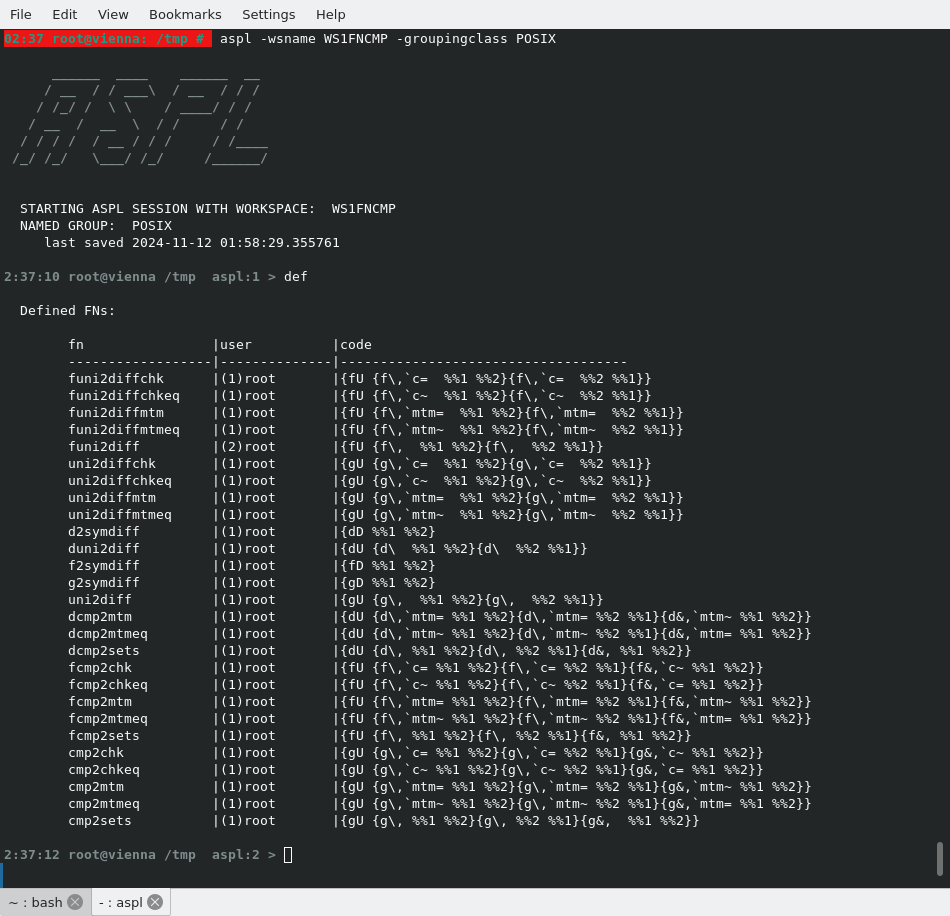
For explanation on how to use these functions refer to Appendix Functions to Compare Groups in ASPL User Guide.